Identify the appropriate automation solution based on the capabilities of the tool.
Describe capabilities and use cases for Flow
Describe and demonstrate capabilities and use cases for the approval process.
Key Topic Areas
This unit prepares you for the workflow and automation section of the Salesforce platform administrator exam, which makes up 16% of the overall exam. This section of the exam tests these topics.
Workflows
Process Builder
Flow Builder
Approval Process
Like the previous unit, this unit contains practice scenario-based questions and flashcards.
Exam Practice Questions
Ready to jump in? The sample tool below is not scored—it’s just an easy way to quiz yourself. To use it, read the scenario, then click the answer you think is correct. Some questions may have more than one correct answer. Click Submit to learn whether the answer you chose is correct or incorrect, and why. If there’s a longer explanation, click to expand the window, then click anywhere in the window to close it. When you reach the end, you can review the answers or retake the questions.
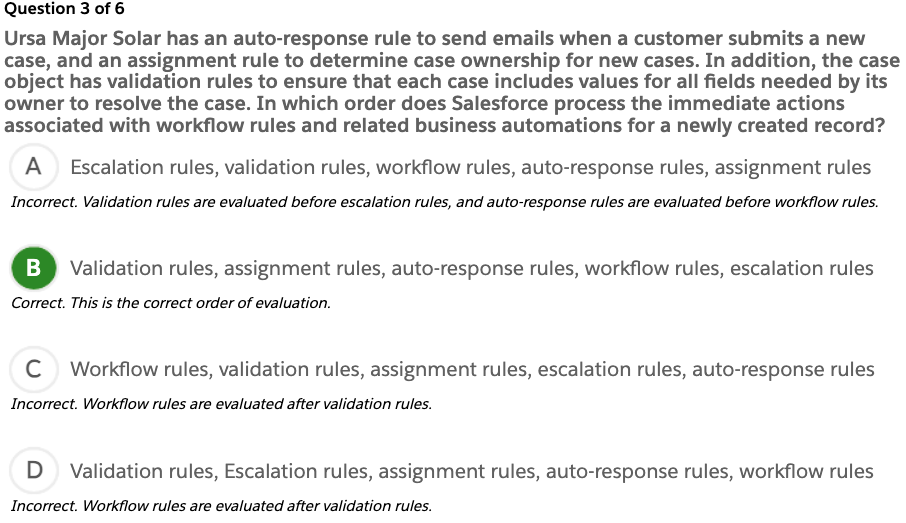
Question 3 of 6
Ursa Major Solar has an auto-response rule to send emails when a customer submits a new case, and an assignment rule to determine case ownership for new cases. In addition, the case object has validation rules to ensure that each case includes values for all fields needed by its owner to resolve the case. In which order does Salesforce process the immediate actions associated with workflow rules and related business automations for a newly created record?
auto-response rule to send emails for new case
assignment rule to determine case ownership
validation rules
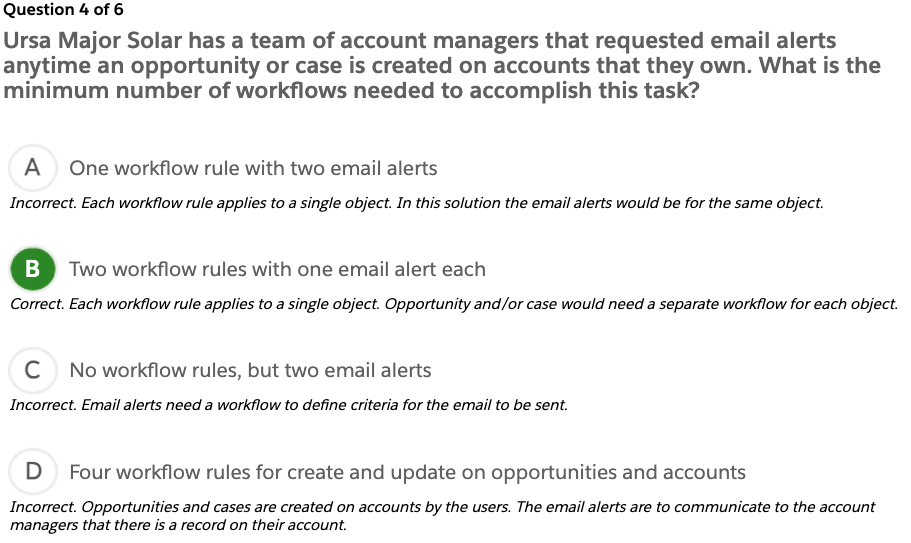
Question 4 of 6
Ursa Major Solar has a team of account managers that requested email alerts anytime an opportunity or case is created on accounts that they own. What is the minimum number of workflows needed to accomplish this task?
trigger record created
check if the opportunity or case is related to the account that the account manager owned
send email
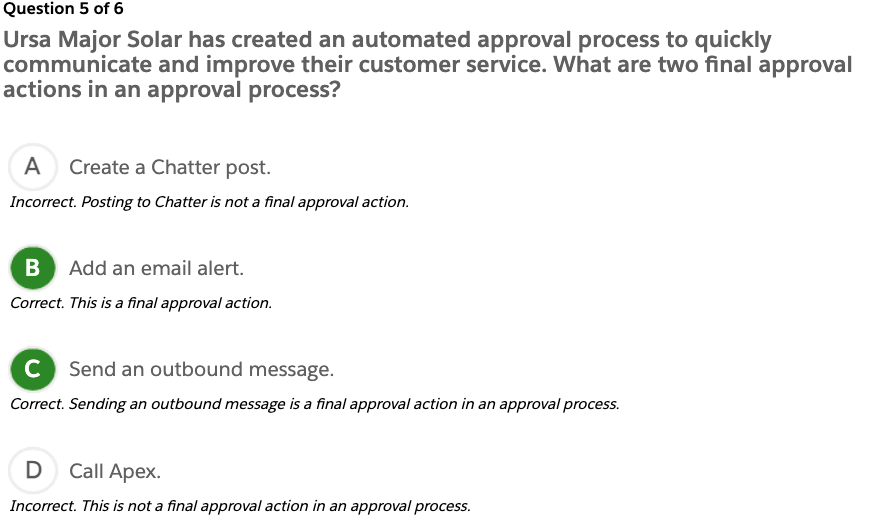
Question 5 of 6
Ursa Major Solar has created an automated approval process to quickly communicate and improve their customer service. What are two final approval actions in an approval process?
change the status to approval
send email
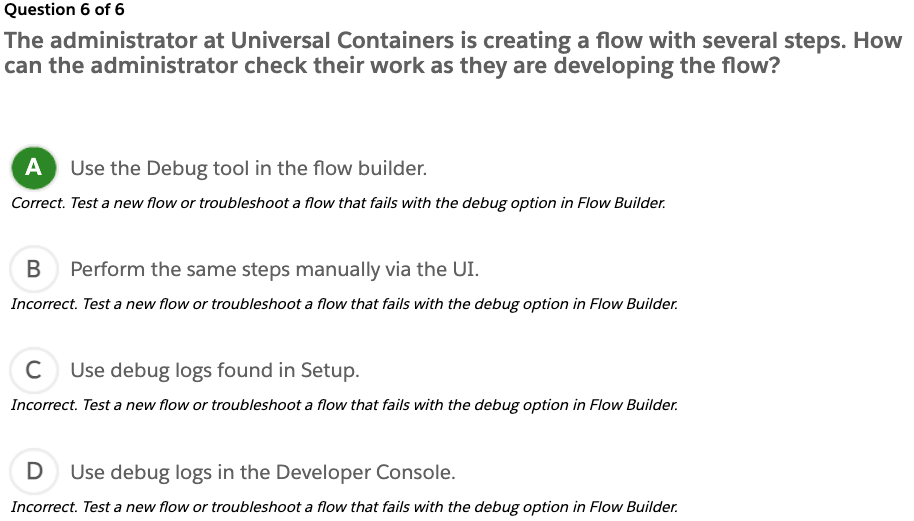
Question 6 of 6
The administrator at Universal Containers is creating a flow with several steps. How can the administrator check their work as they are developing the flow?
Exam Topic Flashcards
The following flashcards cover workflows and automation. Use these interactive flashcards to brush up on some of the key topics you’ll find on this part of the exam.
Read the question or term on each card, then click on the card to reveal the correct answer. Click the right-facing arrow to move to the next card, and the left facing arrow to return to the previous card.
Flashcard 1 of 9
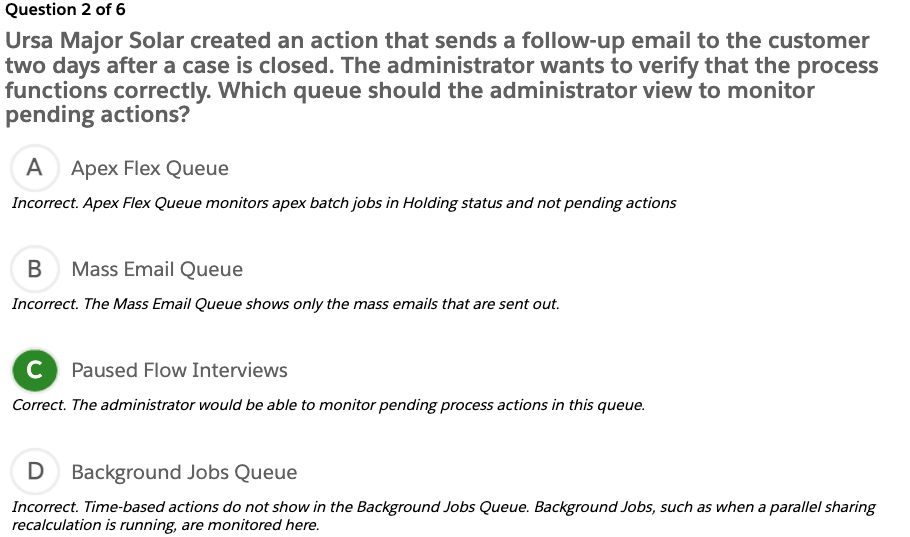
Ursa Major Solar wants to assign a task automatically to account managers when a customer’s agreement is about to expire.
How should an administrator configure this functionality?
Create a time-based workflow on account with a rule criteria of Agreement End Date > TODAY().
An administrator created a workflow rule that sends email alerts when a case with a high priority is created. A new support engineer who works remotely at Ursa Major Solar complains about not receiving the email alerts. All other users at Ursa Major Solar receive these email alerts.
How can an administrator troubleshoot this issue?
Verify the user’s email address
Ursa Major Solar wants to create a workflow rule to send an email alert to members of its board of directors, none of whom use Salesforce.
How many of the board members can be added to a single email alert?
Up to 5 additional email addresses can be added to the email alert.
Flow
An application that can execute logic, interact with the Salesforce database, call Apex classes, and collect data from users
Quick Action
Quick actions can be object specific or global.
The Update action type is not available in global actions.
You can use actions in a process.
Process Trigger
Every process includes a trigger, which tells the process when to start.
How you configure that trigger depends on what type of process you’re creating:
Record change
Event
Invokable (호출 가능)
Approval Process
Automates how records are approved in Salesforce
Specifies each step of approval, including from whom to request approval and what to do at each point of the process
Delete an Approval Process
Before you delete an approval process, make sure it’s inactive.
Delete pending approval requests that are associated with it, and remove them from the recycle bin.
Activate an Approval Process
An approval process must have at least one step before you can activate it. After an approval process is activated, you can’t add, delete, or change the order of the steps, or change its reject or skip behavior, even if the process is inactive.
Practice Exam
Congrats! You’ve completed your Salesforce Platform Administrator certification prep. Ready to put your knowledge to the test? The link below will take you to a timed Salesforce Certified Platform Administrator interactive practice test. This practice test is designed to mimic the actual Platform Administrator exam. When taking the test, be sure to read each question carefully then click on the answer you believe to be correct. Note: some questions may have more than one correct answer. If you are unsure of an answer and would like to come back to it later, click “Review” in the upper right-hand corner to mark a question for review.
When you reach the end of your practice test, click “Submit” to submit your answers. You’ll be taken to a results screen which will display your overall practice test score, the time taken to complete the test, and how you performed on each section. If you’d like to review questions and answers in detail, click “Review” from the results page. You may print your results by clicking the “View/Print” button. Good luck, Trailblazer!
Quiz +100
The Workflow and Automation section makes up what percentage of the Platform Administrator Certification exam? A. 8% B. 10% C. 12% D. 16%
Which key topics are covered in the Workflow and Automation section of the Platform Administrator Certification exam? A. List views, process builder B. Opportunities, Chatter activity C. Creating workflows, approval processes D. Approval processes, Salesforce Knowledge
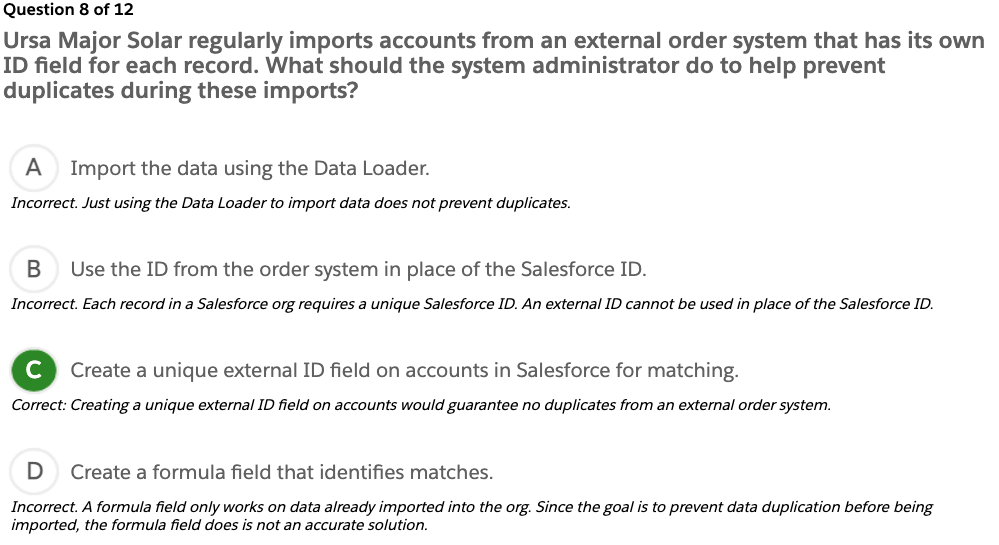
Describe the consideration when importing, updating, transferring, massdeleting, exporting and backing up data.
Describe the capabilities and implication(함축) of data validation tools.
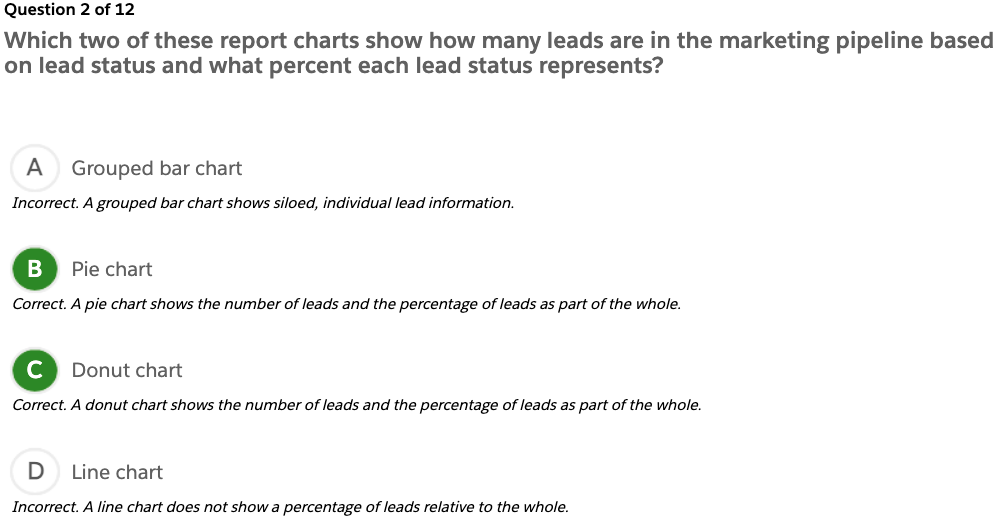
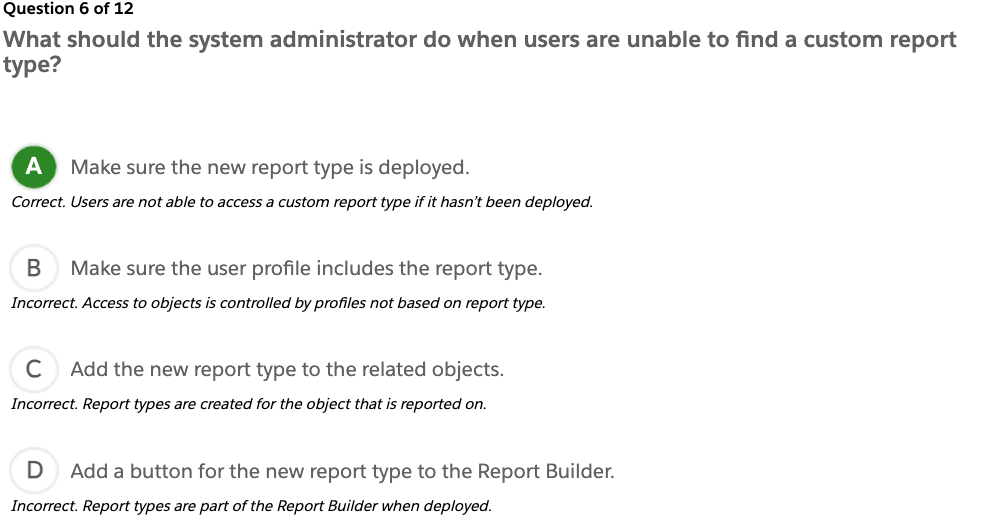
Describe the options available when creating or customizing a report or report type.
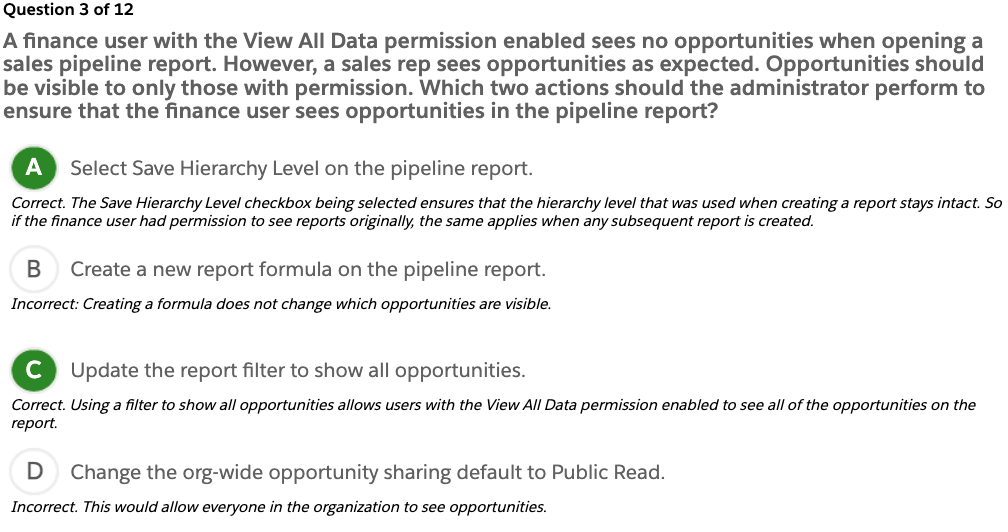
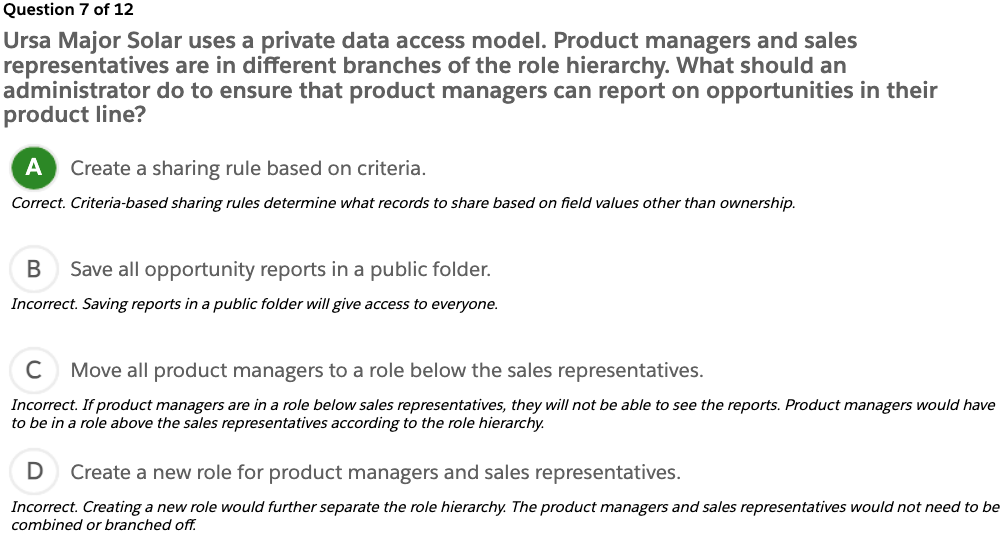
Describe the impact of sharing model on reports.
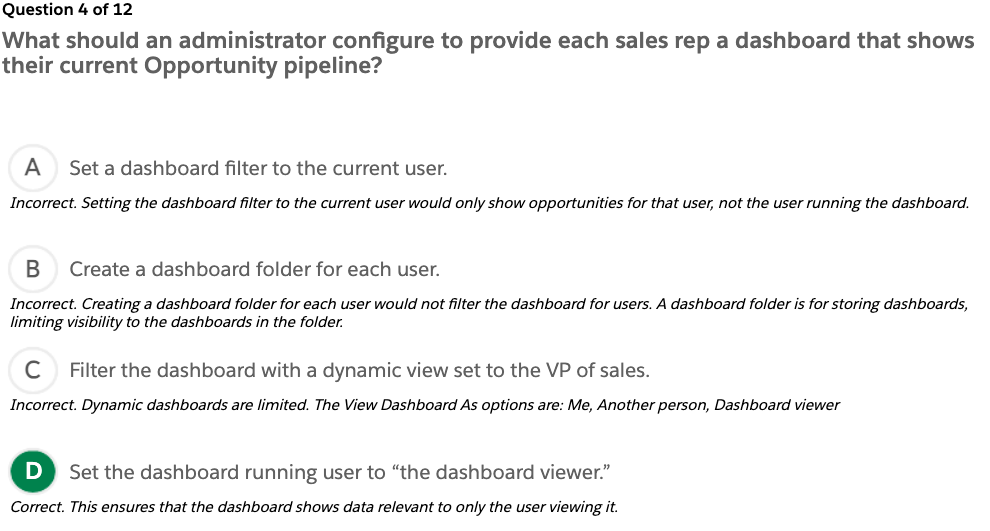
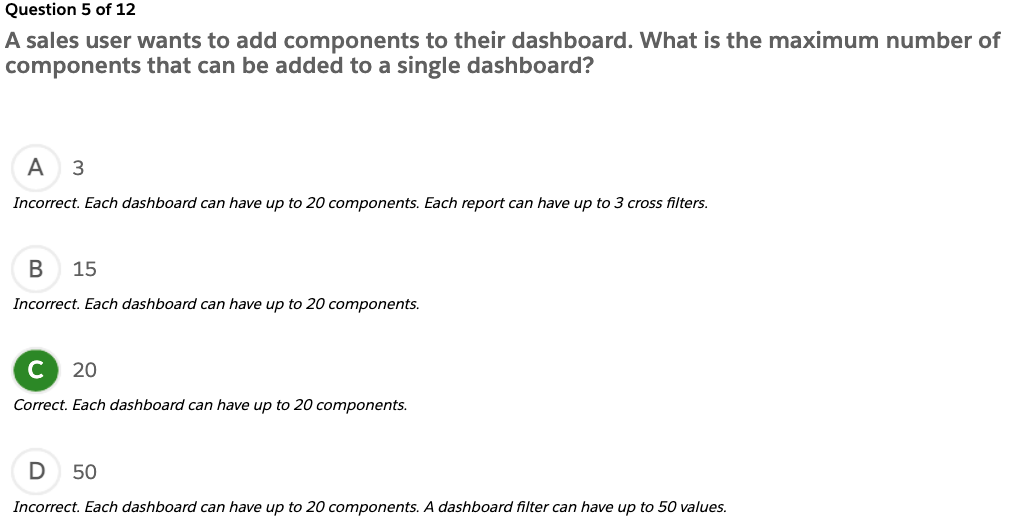
Demonstrate the options available when creating and modifying dashboards.
Key Topic Areas
This unit prepares you for the analytics section of the Salesforce platform administrator exam, which makes up 14% of the overall exam. This section of the exam tests these topics.
Data types
Validation rule
Data Import Wizard
Data Loader
Recycle Bin
Merge function
Mass Transfer
Mass Delete
Duplicate Matching
External ID
Data Export
Report creation
Custom reports
Editing and customizing reports
Dashboard components
Data sharing
Report and dashboard filters
This unit provides a number of interactive, real-world, scenario-based questions that are a lot like the ones you’ll encounter as a Salesforce platform administrator. Looking at these scenarios helps prepare you to take the data and analytics section of the Salesforce platform administrator exam. As you tackle the practice questions, you get immediate feedback on your answers, along with detailed information on why your answers are correct (or incorrect).
You can also find interactive flashcards to help you prepare for the data and analytics section of the exam.
Note For more information on the Salesforce Platform Administrator Certification exam prep, logistics and policies, and maintenance, see the Get Started with Platform Administrator Certification Prep unit in the Platform Administrator Certification Prep: Configuration, Setup and Objects module.
Exam Practice Questions
Ready to jump in? The sample tool below is not scored—it’s just an easy way to quiz yourself. To use it, read the scenario, then click the answer you think is correct. Some questions may have more than one correct answer. Click Submit to learn whether the answer you chose is correct or incorrect, and why. If there’s a longer explanation, click to expand the window, then click anywhere in the window to close it. When you reach the end, you can review the answers or retake the questions.
Exam Topic Flashcards
The following flashcards cover reports, dashboards, and data sharing. Use these interactive flashcards to brush up on some of the key topics you’ll find on this part of the exam.
Read the question or term on each card, then click on the card to reveal the correct answer. Click the right-facing arrow to move to the next card, and the left facing arrow to return to the previous card.
How long is data stored in the Recycle Bin?
Up to 15 days
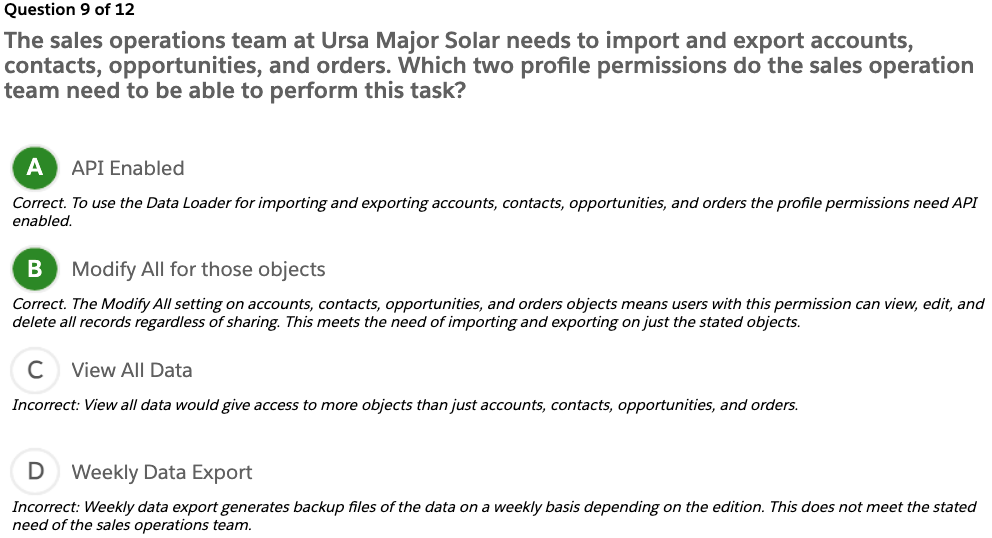
Ursa Major Solar has inconsistent data in its 20,000 existing accounts and asked the system administrator to convert all of the standard country fields to ISO codes. Which method should the system administrator use?
Mass update addresses
Which set of Salesforce records is exported by choosing the Export All option instead of Export in Data Loader?
Records for a specified object including records in the recycle bin
Export All = Export + Recycle Bin
A system administrator uses the Import Wizard to update existing Account records. Which two values can the Import Wizard use to find matching records?
Account Name Site fields
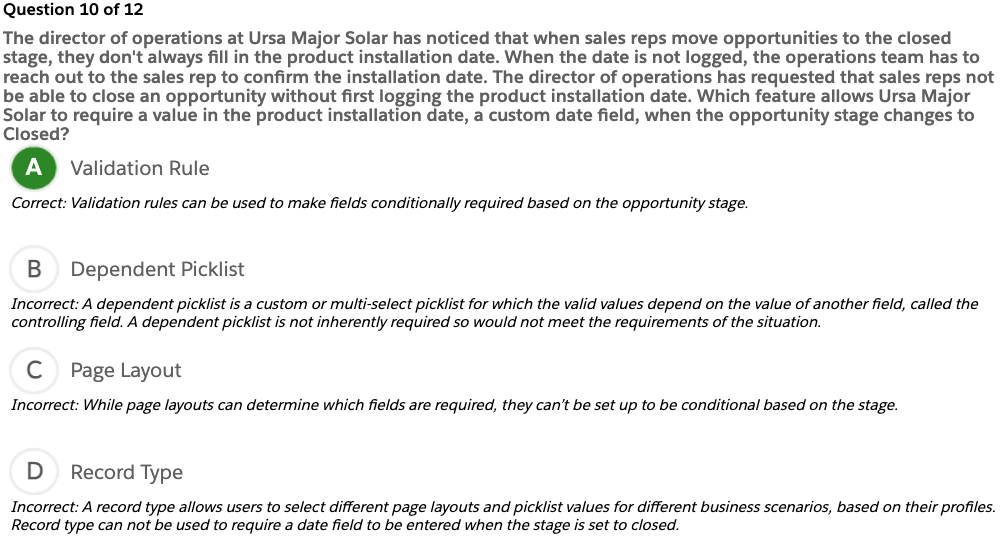
Which configuration option shows sales representatives the fields they must fill in prior to saving an opportunity?
Page Layout required fields
Lookup Filter
Administrator settings that restrict the valid values and lookup dialog results for lookup, master-detail, and hierarchical relationship fields (For example, restrict the Account Name field on opportunities to allow only active accounts.)
Data Import Wizard
A tool to import data for many standard Salesforce objects, including accounts, contacts, leads, solutions, campaign members, and person accounts
Can also import data for custom objects
Can import up to 50,000 records at a time
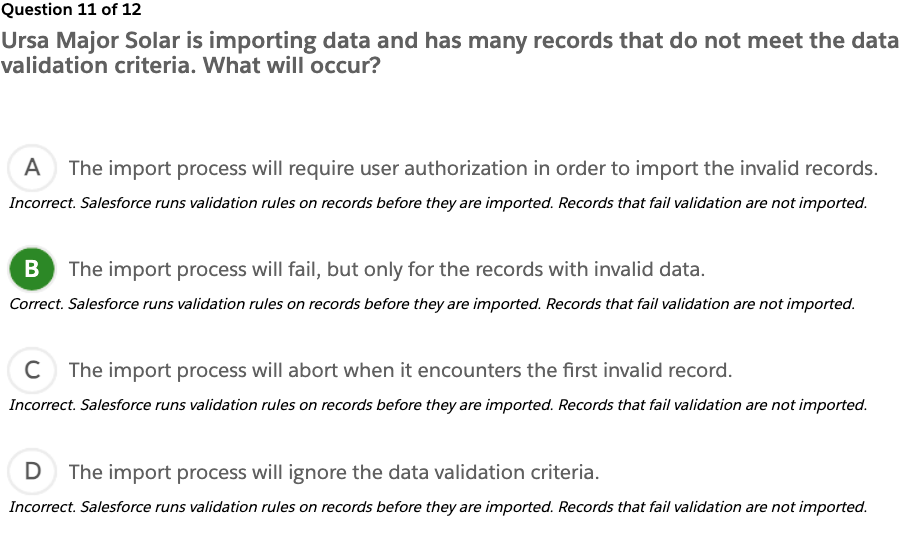
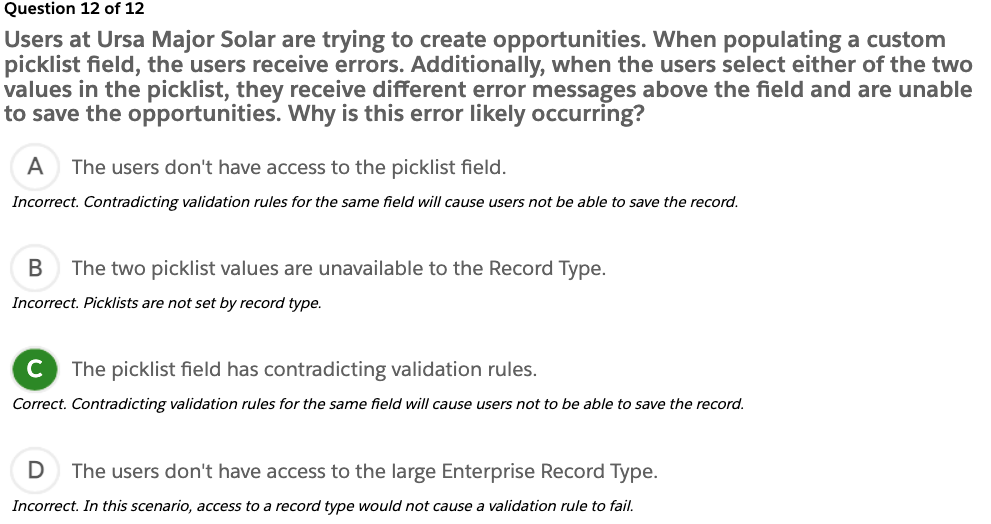
Validation Rules
Verify that the data a user enters into a record meets the standards you specify before the user can save the record
Data Loader vs. Import Wizard
Use Data Loader when:
You need to load 50,000 to 5,000,000 records. Data Loader is supported for loads of up to 5 million records.
You want to schedule regular data loads, such as nightly imports.
You want to export your data for backup purposes.
Use the import wizard when:
You’re loading less than 50,000 records.
You want to turn off processes during an import/update/upsert.
CSV File
Comma Separated Values
A plain text file that contains a list of data
An accepted file format for Data Loader and Data Import Wizard
What report should an administrator use to display the number of contacts related to an account?
Summary report with a report formula
What are three reports that can be used to display a list of the top 10 accounts on a dashboard?
Tabular report with Rows to Display set to 10
Summary report with a chart
Summary report without a chart
What should an administrator do to organize the fields available on a report?
Create a custom report type.
Tabular(표) Report
This report is the simplest and fastest way to look at data. Similar to spreadsheets, it consist simply of an ordered set of fields in columns, with each matching record listed in a row. Use this report type for creating lists of records or a list with a single grand total. They can’t be used to create groups of data or charts, and can’t be used in dashboards unless rows are limited. Examples include contact mailing lists and activity reports.
Summary Report
This report is similar to a tabular report, but allow users also to group rows of data, view subtotals, and create charts. It can be used as the source report for dashboard components. Use this type of report to show subtotals based on the value of a particular field, or when you want to create a hierarchical list, such as all opportunities for your team, subtotal by Stage and Owner.
Matrix Report
Allow you to group and summarize data by both rows and columns
Can be used as the source report for dashboard components
Used for comparing related totals, especially if you have large amounts of data to summarize and you need to compare values in several different fields, or you want to look at data by date and by product, person, or geography
Matrix reports without at least one row and one column grouping show as summary reports on the report run page.
Report Type
Two kinds of report types:
Standard report
Custom report
Standard report-gives you access to most Salesforce data. For example, the opportunities report type gives you access to opportunity records and fields in your report.
Custom report-gives you access to custom objects in Salesforce, or custom views of standard objects, which an admin configures.
Filter Logic
Use filter logic to customize how existing filters apply to a report. Each filter is assigned a number. If you’d like your report to return records that meet the criteria of Filter 1 and either Filter 2 or Filter 3, use this filter logic: Filter 1 AND (Filter 2 OR Filter 3). Filter logic requires at least two field filters.
Quiz +100
The Data Management section makes up what percentage of the Salesforce Platform Administrator Certification exam? A. 5% B. 8% C. 10% D. 14%
Which key topics are covered in the Data Management section of the Platform Administrator Certification exam? A. Permissions sets, objects, and CSV files B. Data loader, Data Import wizard, and external IDs C. Record IDs, IP restrictions, data quality D. Network settings, and data export service, field mapping
Describe the capabilities of activity management such as managing tasks, events, public calendars, and multi-day events.
Describe the features of Chatter such as feed, groups, following, and security.
Describe the capabilities of the Salesforce mobile app.
Identify use case for AppExchange applications.
Key Topics
This unit prepares you for the productivity and collaboration section of the Salesforce platform administrator exam, which makes up 7% of the overall exam. This section of the exam tests these topics.
Activities
Chatter
Salesforce mobile app
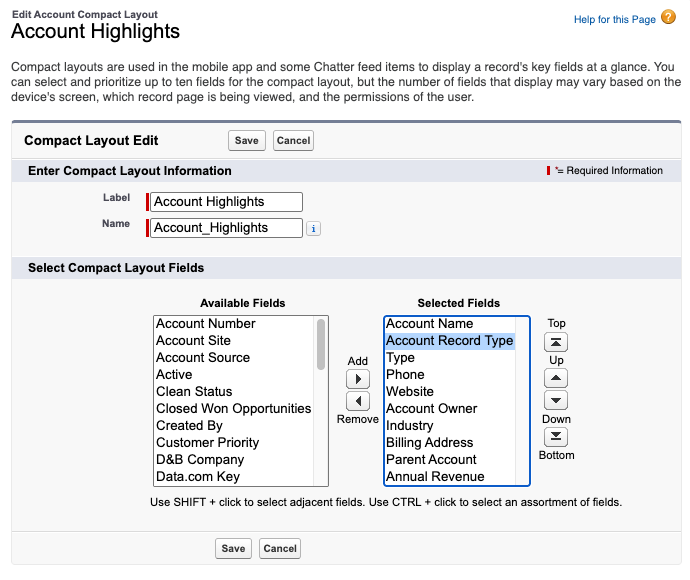
Compact Layout
AppExchange
Like the previous units, this unit contains practice scenario-based questions and flashcards.
Exam Practice Questions
Ready to jump in? The sample tool below is not scored—it’s just an easy way to quiz yourself. To use it, read the scenario, then click the answer you think is correct. Some questions may have more than one correct answer. Click Submit to learn whether the answer you chose is correct or incorrect, and why. If there’s a longer explanation, click to expand the window, then click anywhere in the window to close it. When you reach the end, you can review the answers or retake the questions.
Question 1 of 5
The sales director at Ursa Major Solar has a team of 50 sales reps located around the world. The sales director’s team uses the calendar feature in Salesforce so she can access the team’s busy schedule. However, members of the team log their all-day events differently and the sales director wants some uniformity. How should a sales rep create an all-day event in Salesforce?
A. Use a task for an all-day event because then no time fields are needed.
Incorrect. Tasks within Salesforce are used mostly as to-dos or reminders. Tasks should not be used in place of events.
B. Check the all-day event checkbox on the event.
Correct. Using the all-day event checkbox is the most efficient way to log an all-day event. This avoids the office hours discrepancies of sales reps across multiple time zones.
C. Ensure the event is scheduled for times within the Start and End of Day hours.
Incorrect. Start and End of Day hours differ among the sales director’s international team, so this is not a consistent option.
D. Ask the system administrator to check all-day events in the activity settings.
Incorrect. This option is inefficient as the system administrator shouldn’t have to fix each sales rep’s events.
Question 2 of 5
Ursa Major Solar is implementing Salesforce within its organization. All users at Ursa Major Solar have been loaded into the system, but a small group of users have been identified to be the test users before full company adoption. These test users provide feedback via Chatter to ensure all features and tools are adjusted to work for the company-wide deployment. Which two actions allow the system administrator to limit Chatter access during rollout to a subset of Salesforce users? 회사에 Salesforce를 접목시키는데 사용자를 전부 입력했는데 그 전에 테스트사용자 몇명이 있었는데 test 유저가 Chatter에 모든기능과 툴들이 조정되어야한다고 피드백을 제공했다. 롤아웃하는 동안 특정인들에게 Chatter사용을 제한하는 2가지 방법은?
A. Create a permission set with the Enable Chatter permission for the subset of users.
Correct. A permission set is a collection of settings and permissions that give users access to various tools and functions, such as Chatter.
B. Add the subset of users to the company-wide Chatter group.
Incorrect. Adding the subset of users to the company-wide Chatter group does not limit access to Chatter to just the needed subset of users.
C. Edit a profile to Enable Chatter for the subset of users.
Correct. Profiles define how users access objects and data, and what they can do within the application. When users are created, they’re assigned a profile. In this situation, customizing the profile settings of the subset of users can limit Chatter access to just the specified subset of users.
D. Create an email invitation for the subset of users.
Incorrect. An email invitation is not a way to limit Chatter access because it does not limit other users from accessing Chatter.
Question 3 of 5
As Salesforce adoption has increased throughout Ursa Major Solar, the sales reps need access to the Salesforce mobile app while on the road. However, the Salesforce mobile app needs to be customized to fit their needs. Which two functions can be customized for the Salesforce mobile app?
A. Field permissions
Incorrect. Field security can not be customized exclusively for the Salesforce mobile app. The same field permissions on the desktop version are reflected on the mobile app.
B. Navigation menu content
Correct. The navigation menu can be customized for the Salesforce mobile app.
C. Custom objects
Incorrect. Custom objects can not be customized exclusively for the Salesforce mobile app. Custom objects have the same read/write access on the desktop version as they do on the mobile app.
D. Object Compact layout
Correct: The Object Compact layout can be customized for the Salesforce mobile app.
Question 4 of 5
Ursa Major Solar uses Outlook for its email needs. As Ursa Major Solar has begun to implement Salesforce, sales reps are concerned that Salesforce won’t integrate with Outlook and they’ll be forced to change email providers (which they don’t want to do). What can the system administrator synchronize between Salesforce and Outlook using Outlook Integration?
A. Accounts
Incorrect. Account information can be accessed via Outlook Integration but Account information is not synchronized (downloaded) from Salesforce to Outlook.
B. Events
Correct. Events in Salesforce can be synchronized between Salesforce and Outlook.
C. Recurring tasks
Incorrect. Recurring tasks are not synchronized between Salesforce and Outlook.
D. Notes
Incorrect: Notes are not synchronized between Salesforce and Outlook.
Question 5 of 5
The managers at Ursa Major Solar asked the administrator to quickly provide access to sales reports and dashboards. How can this be done?
A. Build reports and dashboards.
Incorrect. Building all the reports and dashboards would take longer than using the Salesforce Adoption Dashboards app from the AppExchange.
B. Use the Salesforce Auto-Report Builder.
Incorrect. The report builder does not auto generate reports.
C. Search the AppExchange for a Sales Activity Dashboard.
Correct. Salesforce Sales Activity Dashboard app can be found on the AppExchange.
D. Log a case to Salesforce Support.
Incorrect. Salesforce support is not needed.
Exam Topic Flashcards
The following flashcards cover Chatter, tasks, and events. Use these interactive flashcards to brush up on some of the key topics you’ll find on this part of the exam.
Read the question or term on each card, then click on the card to reveal the correct answer. Click the right-facing arrow to move to the next card, and the left facing arrow to return to the previous card.
Flashcard 1 of 6
How should a Chatter user send a message to another Chatter user that cannot be viewed by anyone else?
>> DM or wisper
Post a private message to the recipient
Flashcard 2 of 6
Activities
Records, either tasks or events, of the interactions your organization has with records such as your accounts, contacts, and opportunities
Flashcard 3 of 6
Chatter Groups Features
Users in a Chatter group can: – Collaborate in a private, public, or unlisted group. – Use Announcements for important messages. – Post updates, files, and links. Include customers in private groups.
Flashcard 4 of 6
What option can be added to Outlook Publisher Layouts?
Quick Actions
Flashcard 5 of 6
Outlook Integration
Link emails in Microsoft Outlook to contacts, leads, accounts, opportunities, and cases in Salesforce Relate events to records within Salesforce
Flashcard 6 of 6
Salesforce Mobile App
Gives you access to the same information you see on your computer, but organized for getting work done while away from the office
Given a scenario, identify how to automate case management.
Key Topics
This unit prepares you for the service and support applications section of the Salesforce platform administrator exam, which makes up 11% of the overall exam. This section of the exam tests these topics.
Case management
Support processes
Assignment rules
Case escalation rules
Auto-response rules
Web-to-case
Email-to-case
Case teams
Knowledge
Sites using Experience Cloud (formerly Communities)
Like the previous units, this unit contains practice scenario-based questions and flashcards.
Exam Practice Questions
Ready to jump in? The sample tool below is not scored—it’s just an easy way to quiz yourself. To use it, read the scenario, then click the answer you think is correct. Some questions may have more than one correct answer. Click Submit to learn whether the answer you chose is correct or incorrect, and why. If there’s a longer explanation, click to expand the window, then click anywhere in the window to close it. When you reach the end, you can review the answers or retake the questions.
Question 1 of 3
Ursa Major Solar provides various levels of customer support. The VP of support wants an automated way to notify the support team when an unresolved case has been open for over 4 hours. Which feature should be used to alert support managers when a case has been open for more than 4 hours? 4시간동안 해결되지 않은 case가 있다면 써포트팀에 공지를 하고 싶어요. 어떤 기능을 이용해서 구현할수 있을까요? C
A. Case queues
Incorrect: Case queues prioritize, distribute, and assign records to teams who share workloads. However, just placing a case in a queue does not alert a support manager that a case is in jeopardy.
B. Auto-response rules
Incorrect: Auto-response rules send automatic email responses to lead or case submissions based on the record’s attributes. For example, set up an auto-response rule to send quick replies to customers to let them know someone at your company received their inquiry or details about their issue.
C. Escalation rules
Correct: Escalation rules automatically escalate cases when the case meets the criteria defined in the rule entry.
D. Case assignment rules
Incorrect: Case assignment rules define conditions that determine how leads or cases are processed. However, as soon as a match is found, Salesforce processes the item and stops evaluating the rule entries for that item.
Question 2 of 3
Ursa Major Solar has noticed an uptick(상승세) in support cases that could be resolved easily if the customers had access to the proper documentation. So, Ursa Major Solar wants to create a knowledge base where articles can be classified into categories. What are two benefits of using Data Categories with Salesforce Knowledge? 안내문서가 있다면 쉽게 해결될 수 있는 문의가 쇄도하고 있어요. 지식들을 카테고리별로 정리된 포스트로 정리하고 싶어요. Data Categores와 Salesorce Knowledge를 이용했을때 이득보는 두가지?B,C
A. Article owners can track views.
Incorrect. The use of Data Categories does not affect whether article owners can track article views.
B. Articles can be classified into groups.
Correct. Data Categories with Salesforce Knowledge allows articles to be classified into groups, which makes the articles easier to find.
C. Article access can be controlled.
Correct. Data Categories with Salesforce Knowledge allows controlled article access. For example, US users could be limited to knowledge articles specific to US products, while European users have access only to knowledge articles regarding products exclusive to Europe.
D. Articles can be referenced in Chatter posts.
Incorrect. Data Categories do not affect if articles can be posted to Chatter.
Question 3 of 3
Ursa Major Solar is looking to reduce support costs by allowing customers to work together to answer one another’s questions and solve problems. Which feature should a Salesforce administrator use to allow its customers to interact with each other and share best practices? A
A. Sites using Experience Cloud (formerly Communities)
Correct. Sites using Experience Cloud are a great way to share information and collaborate with people who are key to your business processes, such as customers, partners, or employees. This also includes collaboration between customers.
B. Campaigns
Incorrect. A campaign is an outbound marketing project that you plan, manage, and track within Salesforce.
C. Omni-channel
Incorrect. Omni-channel routes are any type of incoming work item to the most qualified, available support agents in your call center. It’s not a collaboration tool between customers.
D. Mass emails
Incorrect: Mass emails don’t allow customers to interact with each other to share best practices.
Exam Topic Flashcards
The following flashcards cover case management, knowledge, assignment rules, and sites using Experience Cloud. Use these interactive flashcards to brush up on some of the key topics you’ll find on this part of the exam.
Read the question or term on each card, then click on the card to reveal the correct answer. Click the right-facing arrow to move to the next card, and the left facing arrow to return to the previous card.
Flashcard 1 of 10
What configuration action should be performed to ensure every case gets assigned to a valid Owner?
>> Case assign
Define the Default Case Owner in Support Settings.
Flashcard 2 of 10
Support representatives at Ursa Major Solar want the same technical engineer group to be associated with each new case.
>> Escalate
A case assignment rule to associate the case team
Flashcard 3 of 10
What Salesforce feature should a company implement to provide a method for its resellers to track their leads and opportunities?
>> ??
Partner Site using Experience Cloud
Flashcard 4 of 10
Ursa Major Solar wants internal support requests to be directed to any of the IT representatives. They want external support requests to be directed to customer support representatives based on the contact’s location.
>> ??
Assignment Rules and Queues
Assignment Rule이 “Internal”인 걸 확인. Queue에 넣으면 여러 IT 담당자가 Queue 멤버로 들어가 있고 그중 아무나 가져가서 처리 가능
Flashcard 5 of 10
Web-to-case
>> web site에서 case를 등록하게 해주는것
Gather customer support requests directly from your company’s website and automatically generate new cases.
Flashcard 6 of 10
Sites using Experience Cloud
>> 파트너사
Provide a way for employees, customers, and partners to connect in one place. Companies can collaborate and communicate outside of the company with people who are key to the business.
Flashcard 7 of 10
Assignment Rules
>> 뭔가 일이 왔을때 어느팀 누구한테 일을 배정할지 정하는거?
Define conditions that determine how leads or cases are processed
Flashcard 8 of 10
Auto-response Rules
>> 고객문의에 자동답변
Send automatic email responses to lead or case submissions based on the record’s attributes
Flashcard 9 of 10
Salesforce Knowledge
>> 회사매뉴얼이나 도움말등을 문서로 작성해서 저장하는 기능
Create and manage a knowledge base with your company information Securely share it when and where it’s needed
Flashcard 10 of 10
Case Escalation Rules
>> 해결못하는 케이스를 다른 팀에 넘기는 규칙
Escalate cases automatically when the case meets the criteria defined in the rule entry
어떤 조건을 만족하면 다음 사람에게 일이 넘어가는 규칙
Quiz+100
1. The Service and Support Applications section makes up what percentage of the the Salesforce Platform Administrator Certification exam?
A. 5%
B. 11%
C. 13%
D. 21%
2. Which key topics are covered in the Service and Support Applications section of the Salesforce Platform Administrator Certification exam?
A. Knowledge, Experience Cloud, and Chatter
B. Assignment rules, case escalation rules, and auto-response rules
C. Case management, flow builder, and support processes
Given a scenario, identify the capabilities and implications of the sales process.
Given a scenario, identify the appropriate sales productivity features using opportunity tools.
Describe the capabilities of lead automation tools and campaign management.
Key Topics
This unit prepares you for the sales and marketing applications section of the Salesforce platform administrator exam, which makes up 12% of the overall exam. This section of the exam tests these topics.
Sales processes
Opportunities
Leads
Campaigns
This unit includes a number of interactive, real-world, scenario-based questions that are a lot like the ones you can encounter as a Salesforce platform administrator. Looking at these scenarios helps prepare you to take the sales and marketing applications section of the Salesforce Platform Administrator exam. As you tackle the practice questions, you get immediate feedback on your answers, along with detailed information on why your answers are correct (or incorrect).
The unit also contains interactive flashcards to help you prepare for the sales and marketing applications section of the exam.
Note For more information on the Salesforce Platform Administrator Certification exam prep, logistics and policies, and maintenance, see the Get Started with Platform Administrator Certification Prep unit in the Platform Administrator Certification Prep: Setup and Objects module.
Exam Practice Questions
Ready to jump in? The sample tool below is not scored(득점됨)—it’s just an easy way to quiz yourself. To use it, read the scenario, then click the answer you think is correct. Some questions may have more than one correct answer. Click Submit to learn whether the answer you chose is correct or incorrect, and why. If there’s a longer explanation, click to expand the window, then click anywhere in the window to close it. When you reach the end, you can review the answers or retake the questions.
Question 1 of 3
Ursa Major Solar has created a new product line of solar panels with a special sales team to sell these products. The sales process for the new line is more complex than the current sales process and requires additional stages to the sales path. How should the system administrator configure Salesforce to ensure only the appropriate stages are visible based on the product line? 새로운 제품라인에 Stage를 추가해서 다른 제품들과 다른 Sales Process를 갖게함
A. Create a sales process and Opportunity record type for each product line.
Correct. Two configurations need to be made. 1) Create a new sales process to determine which stages appear for this new product line. 2) Create a new Opportunity record type to display a unique page layout for this new product line.
B. Create a validation rule to display the appropriate stages based on product line.
Incorrect. Validation rules verify that the data a user enters in a record meets the standards you specify before the user can save the record. Therefore, a validation rule would not meet the needs of displaying the appropriate stages to the new sales team.
C. Create new forecast categories and assign the new stage picklist values to those categories.
Incorrect. A forecast category is the category within the sales cycle to which an opportunity is assigned based on its opportunity stage. Creating new forecast categories would not result in the appropriate stages becoming visible for the new sales team.
D. Create a validation rule to display the appropriate stages based on the user’s role.
Incorrect. Validation rules verify that the data a user enters in a record meets the standards you specify before the user can save the record. Therefore, a validation rule would not meet the needs of displaying the appropriate stages to the new sales team.
Question 2 of 3
Ursa Major Solar’s newest product line has just been announced. The web form on the Ursa Major Solar website is generating a lot of leads where prospects have indicated interest in particular products. These leads are imported directly into Salesforce automatically. Which two features should the system administrator use to assign ownership of a Lead to the appropriate product team using the custom Lead field Product Interest? 웹사이트에 연동된 제품문의하기가 너무 많이 와서 해당팀에 자동으로 lead를 들어가게 해놨는데 ownership을 할당해야하는데 어떻게 할지 두가지 선택
A. Assignment Rules
Correct. Assignment rules define conditions that determine how leads or cases are processed. In this scenario, when a potential customer indicates interest in a certain product (custom Lead field Product Interest) in the web form, the lead is generated and assigned to the appropriate product team.
B. Escalation Rules
Incorrect. Escalation rules are used to specify the conditions under which a case escalates. Leads are not cases, so escalation rules do not apply in this situation.
C. Lead Teams
Incorrect. A Lead Team refers to a group of users who can view/access a lead. It does not assign ownership as requested.
D. Queues
Correct. Queues prioritize, distribute, and assign records to teams who share workloads. In this scenario, it’s indicated that the lead needs to be assigned to the appropriate product teams, so queues are needed.
Question 3 of 3
Sales representatives at Ursa Major Solar are working on opportunities and need to see how their colleagues have effectively managed other opportunities with comparable products, competing against the same competitors. Which two features should an administrator use to allow for this?
A. Opportunity Dashboard
Correct. An opportunity dashboard allows reporting and comparison of products.
B. Chatter groups
Correct. A chatter group will allow for discussion and sharing of the dashboard.
C. Opportunity update reminders
Incorrect. Reminder updates will not allow for comparison or discussion.
D. Big deal alerts
Incorrect. Big Deal Alerts automatically email your users whenever an opportunity reaches a threshold of amount and probability.
Exam Topic Flashcards
The following flashcards cover sales processes, opportunities, products, and leads. Use these interactive flashcards to brush up on some of the key topics you’ll find on this part of the exam.
Read the question or term on each card, then click on the card to reveal the correct answer. Click the right-facing arrow to move to the next card, and the left facing arrow to return to the previous card.
Flashcard 1 of 8
Custom fields in the Lead object can be mapped to what objects?
Opportunity, Account, Contact
Flashcard 2 of 8
Ursa Major Solar has an inside sales team that sells only warranty renewals, and an outside sales team that sells only products. Each type of sale captures different information and has a different sales cycle. How should the system administrator configure Salesforce to meet these requirements?
Create a page layout, sales process, and record type for each type of sale.
Flashcard 3 of 8
Ursa Major Solar offers a variety of products that are comparable to products from other companies. Sales representatives request a method to track product strengths and weaknesses compared to those offered by other vendors. What should the system administrator implement?
Competitors on the opportunity page layout
Flashcard 4 of 8
How should the system administrator implement weekly notifications for sales reps that include opportunities that need attention based on the opportunity owner’s last login, past due opportunities, and all opportunities that have not been updated in the last 30 days?
Create opportunity update reminders.
Flashcard 5 of 8
Ursa Major Solar sells through many different reseller networks. Each reseller’s deals are tracked on separate opportunities. The sales manager is concerned that the pipeline report is not accurate due to multiple opportunities for the same end customer. How should the sale process be modified to ensure opportunities are not double-counted in the pipeline?
Change the forecast category to Omitted on the duplicate opportunities.
forecast
pipeline accuracy
revenue prediction
commit / best case
무조건 Forecast Category 떠올리기
Flashcard 6 of 8
Which three objects can be related to campaign members?
Leads, Contacts, Person Accounts
Flashcard 7 of 8
How can multiple Campaign records be associated with a single opportunity?
Campaign Influence
Flashcard 8 of 8
What two related lists should be added to the opportunity page layout to track how campaigns contribute to the overall pipeline?
Campaign Influence
🔑 이 섹션의 핵심 범위
1️⃣ Opportunities
Sales process
Stage
Forecast
Opportunity team
Path ➡ 영업 파이프라인의 중심
2️⃣ Products
Product catalog
Product를 Opportunity에 추가
Product schedules (수량/매출 스케줄)
3️⃣ Price Books
Standard vs Custom price book
Product 가격을 상황별로 다르게 관리
Opportunity에 어떤 Price Book이 연결되는지
즉 👉 “어떻게 상품을 팔고 매출을 만든다” 흐름을 보는 영역.
Quiz +25
The Sales and Marketing Applications section makes up what percentage of the Salesforce Platform Administrator Certification exam? A. 8% B. 10% C. 12% D. 14%
Which key topics are covered in the Sales and Marketing Applications section of the Salesforce Platform Administrator Certification exam? A. Sales processes, content, and assignment rules B. Opportunities, products, and price books C. Campaigns, marketing cloud, and case management D. Leads, flow, and accounts
Describe the standard objectarchitecture and relationship model
Explain how to create, edit, delete, and customize fields and page layouts on standard and custom objects and the implications(함의) of deleting fields.
Determine how to create and assign page layouts, record types, and business processes for standard and custom objects.
Practice common scenarios related to standard and custom objects.
Key Topics
This unit prepares you for the Object Manager and Lightning App Builder section of the Salesforce Platform Administrator exam, which makes up 15% of the overall exam. This section of the exam tests these topics.
Object architecture
Object relationships
Creating, editing, and deleting fields
Creating and assigning page layouts
Creating and assigning record types
Creating and assigning business processes
Creating custom objects
Like the previous units, this unit contains practice scenario-based questions and flashcards.
Exam Practice Questions
Ready to jump in? The sample tool below is not scored—it’s just an easy way to quiz yourself. To use it, read the scenario, then click the answer you think is correct. Some questions may have more than one correct answer. Click Submit to learn whether the answer you chose is correct or incorrect, and why. If there’s a longer explanation, click to expand the window, then click anywhere in the window to close it. When you reach the end, you can review the answers or retake the questions.
Question 1 of 10
The VP of sales at Ursa Major Solar wants to take a look at all of the sales deals that are currently in play for the Sales team to determine how well they’re tracking toward their goal for quarter end. Which standard object stores information about sales deals? Opportunity
Question 2 of 10
A sales team member at Ursa Major Solar wants to view information related to one of their accounts to have a 360-degree view of the customer. Which two standard objects are related to account records? Lead, Opportunities
Question 3 of 10
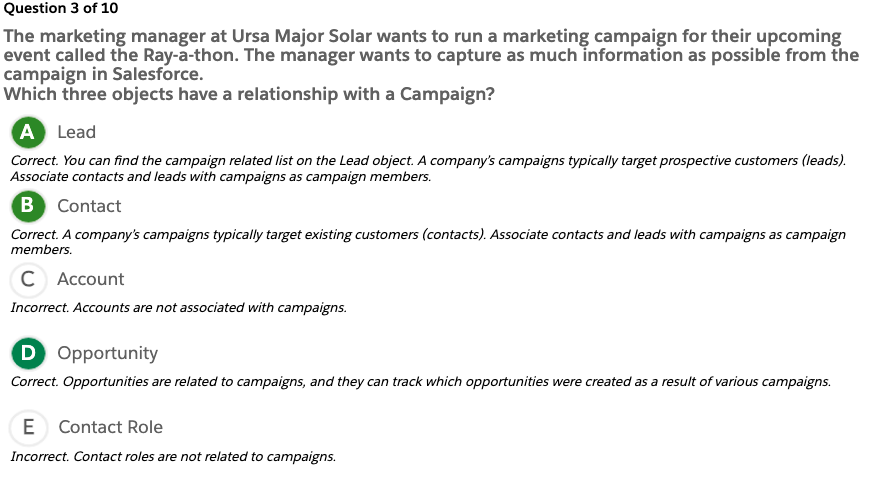
The marketing manager at Ursa Major Solar wants to run a marketing campaign for their upcoming event called the Ray-a-thon. The manager wants to capture as much information as possible from the campaign in Salesforce. Which three objects have a relationship with a Campaign? Lead, Contact, Opportunity
Question 4 of 10
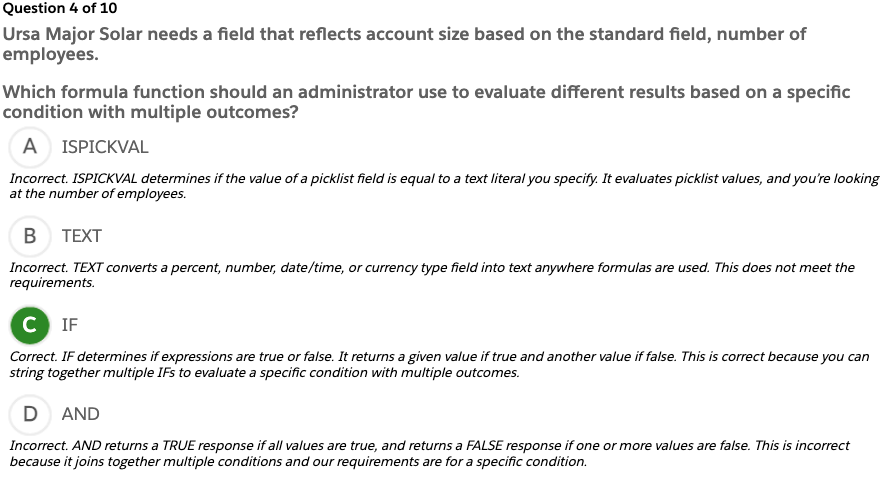
Ursa Major Solar needs a field that reflects account size based on the standard field, number of employees. Which formula function should an administrator use to evaluate different results based on a specific condition with multiple outcomes? IF
Question 5 of 10
The sales managers at Ursa Major Solar want opportunities that have not been updated in the past 30 days to automatically be flagged. How should an administrator implement this requirement?
Question 6 of 10
The Ursa Major Solar CEO does not want to see the list of contacts when viewing an account page but still needs to access contact records. How should the administrator configure this?
Question 7 of 10
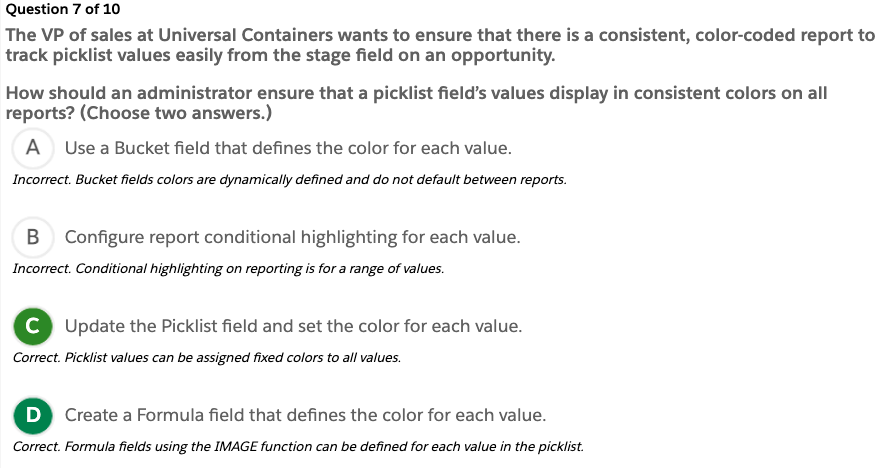
The VP of sales at Universal Containers wants to ensure that there is a consistent, color-coded report to track picklist values easily from the stage field on an opportunity. How should an administrator ensure that a picklist field’s values display in consistent colors on all reports? (Choose two answers.)
Question 8 of 10
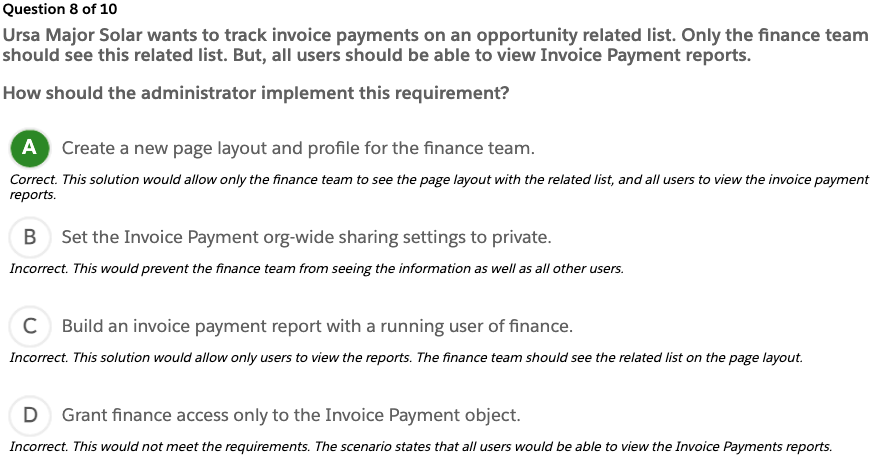
Ursa Major Solar wants to track invoice payments on an opportunity related list. Only the finance team should see this related list. But, all users should be able to view Invoice Payment reports. How should the administrator implement this requirement?
Question 9 of 10
The marketing team at Ursa Solar Major wants a chart added to the home page specific to their lead generation. What should an administrator recommend to meet this request?
Question 10 of 10
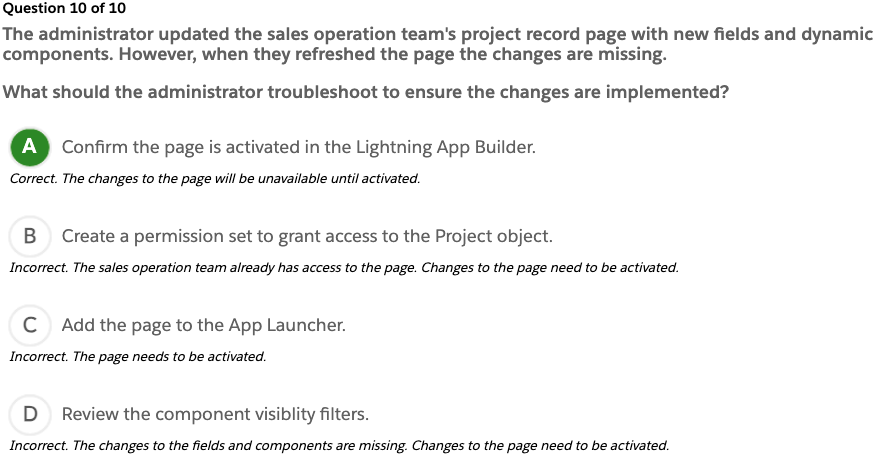
The administrator updated the sales operation team’s project record page with new fields and dynamic components. However, when they refreshed the page the changes are missing. What should the administrator troubleshoot to ensure the changes are implemented?
Exam Topic Flashcards
The Object Manager and Lightning App Builder section of the exam covers object relationships, creating custom objects, and creating and assigning page layouts, record types, and business processes. Use these interactive flashcards to brush up on some of the key topics you’ll find on this part of the exam.
Read the question or term on each card, then click on the card to reveal the correct answer. Click the right-facing arrow to move to the next card, and the left facing arrow to return to the previous card.
Flashcard 1 of 11
A delegated(위임된) administrator at Ursa Major Solar cannot edit the Created Date field for the account record. What reason should the administrator give for why this is occurring?
This is a System Audit field and it’s Read-Only for existing records.
Flashcard 2 of 11
Ursa Major Solar wants to create a field to store credit card numbers and needs to make sure the information is protected. What two actions allow the administrator to provide enhanced security for this field?
>> 카드번호를 사용자 비번이랑 결합해서 암호화해서 사용자비번을 입력하게 한뒤 해당 카드번호를 풀어서 사용한다. 해당 필드를 빌링팀만 접근하도록 권한을 제한한다.
Create an encrypted text field. Update field-level security settings.
Flashcard 3 of 11
Ursa Major Solar has a renewals sales team that uses the Opportunity object. The team wants to use many of the same picklist fields that are already defined, but needs unique picklist values. What feature allows an administrator to maintain the same field for two different teams?
>> Global Value Set
Record Types
일단 Unique picklist를 잘못 번역했어. 각 팀마다 서로 다른 picklist value를 쓰고 싶다는건데 unique picklist를 고유한 값으로 쓰고 싶다고 알아듣고 Global Value Set에 저장하면 되겠다고 생각했는데. 사실 여기서 말한 unique는 각팀마다 서로 다른 값을 사용하고 싶다고 한거야. Global Value Set은 여러 필드가 같은 값을 사용할때 쓰는것이고, Record Types에서는 같은 필드인데 값을 다르게 보여주는 거기 때문에 문제에서 요청한 기능을 구현하려면 Record Types을 써야하는거야.
Flashcard 4 of 11
Ursa Major Solar has a sales team focused on renewals. The team uses many of the same Opportunity fields as other teams, but needs different Stage values. What should the administrator update to support this requirement?
Stage Selected Values in the Sales Processes
핵심은 Stage 값은 “Record Type”이 아니라 “Sales Process”에서 컨트롤한다는 거야.
Renewal 팀은
Opportunity 필드는 대부분 동일하게 사용
❗ Stage 값만 다르게 쓰고 싶음
즉 → 페이지 레이아웃이나 필드가 문제가 아님. 👉 Stage picklist에 어떤 값이 보이냐가 문제
Stage는 일반 Picklist랑 다름
보통 picklist는 Record Type에서 선택값을 제어 하지만 Opportunity의 Stage는 특별해서 Sales Process에서 제어됨
Opportunity
 ├─ Record Type
 │    └─ Sales Process 연결됨
 │          └─ Stage 선택값 결정
Renewal 팀만 다른 Stage를 쓰려면
Renewal용 Sales Process 만들고
거기서 Stage 값 다르게 선택
그 Sales Process를 Renewal용 Record Type에 연결
그래서 정답이 Stage Selected Values in the Sales Processes
Flashcard 5 of 11
The customer support team wants to use a different Page Layout when closing a Case. What method should the administrator use to fulfill this request?
>> Page Layout
Case Close Page Layout
Case Close Page Layout은 Case를 Close할 때만 뜨는 전용 레이아웃. Object Manager에서 만드는 일반 Page Layout이랑 다름. 따로 존재하는 거임. 평소에는 상담 중이라 입력 필드 많으면 귀찮음. Close 할 때만 Resolution 입력 받기.
Setup > Object Manager > Case > Page Layouts > Case Close Page Layout
> Case Close Page Layout 생성
종료할 때 필요한 필드 배치
필수값 설정 가능
Flashcard 6 of 11
Formula Field
>> 실제로 존재하는게 아니고 보고서에 즉석에서 계산해서 보여주는 필드
A read-only field whose value is evaluated from the formula or expression defined by us. You can define formula field on both standard and custom objects. Any change in expression or formula automatically updates the value of formula field. You can define formula field for 7 types: – Number – Currency – Percent – Date – Date / Time – Checkbox – Text To change to the next or previous card, click the Next (n keystroke) or Previous (p keystroke) button.
Flashcard 7 of 11
Custom Objects
>> Standard Objects이외에 더필요하면 임의로 만들어서 추가해서 쓰는 오브젝트지
Objects that you create to store information that’s specific to your company or industry.
Flashcard 8 of 11
Roll-up Summary Field
>> related field를 grouping해서 SUM, MIN, MAX등의 그룹함수를 사용해서 필드에 같이 보여주는것
A custom object field that calculates values from related records or the records in a related list. Created to display a value in a master record based on the values of fields in a detail record.
Flashcard 9 of 11
Lookup Field
>> 필드값을 다른 레코드에서 검색해와서 선택하도록 만든 필드. 하나의 부모에 여러개의 자식값을 가질수 있는 필드. Lookup Field도 Master-Detail과 동일하게 부모필드를 참조하지만 Master-Detail처럼 강하게 묶여 있지는 않아서 Parent를 삭제해도 상관없다.
Also a one-to-many relationship, but in this relationship, two objects has no effect on deletion or security. Child objects are independent. Child objects have a separate setting. If you delete the parent object, the child object remains in the system. A child object may or may not have a parent.
Lookup Relationship
loosely coupled relationship
optional parent
independent security & deletion
Flashcard 10 of 11
Master-detail
>> 부모자식 관계가 끈끈해서 부모삭제하면 자식도 삭제됨
Closely links objects together such that the master record controls certain behaviors of the detail and subdetail record. (For example, you can define a two-object master-detail relationship, such as Account—Expense Report, that extends the relationship to subdetail records, such as Account—Expense Report—Expense Line Item. You can then perform operations across the master—detail—subdetail relationship.)
Flashcard 11 of 11
One-to-many
>> 하나의 레코드에 다른 연결된 레코드를 여러개 가질수 있을때
Relationship with many child objects but one Parent Object. (Example: Many metro cities are associated with one country.) This kind of relationship is represented in four different forms: Master-detail, LookUp (loosely coupled relationship), Self, Hierarchical
Quiz
The Object Manager and Lightning App Builder section makes up what percentage of the Platform Administrator Certification exam? A. 5% B. 10% C. 15% D. 25%
Which key topics are covered in the Object Manager and Lightning App Builder section of the Platform Administrator Certification exam? A. Reports and dashboards, dynamic content, and customizing page layouts B. Object architecture, creating and customizing flows, and Chatter C. Object relationships, creating custom objects, and creating and assigning page layouts D. Creating and assigning record types, dynamic content, AppExchange
This unit prepares you for the configuration and setup section of the Salesforce Platform Administrator exam, which makes up 15% of the overall exam. This section of the exam tests these topics.
UI features
Company information
Locale settings
Search results
List views
Currency management
Fiscal year
Default settings
Homepage layouts
User management
Security settings
Sharing settings
As you tackle the practice questions, you get immediate feedback on your answers, along with detailed information on why your answers are correct (or incorrect).
Exam Practice Questions
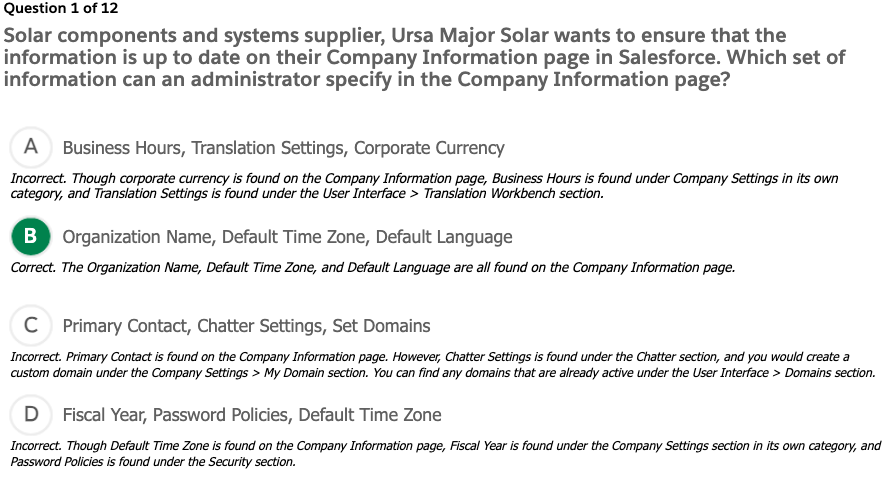
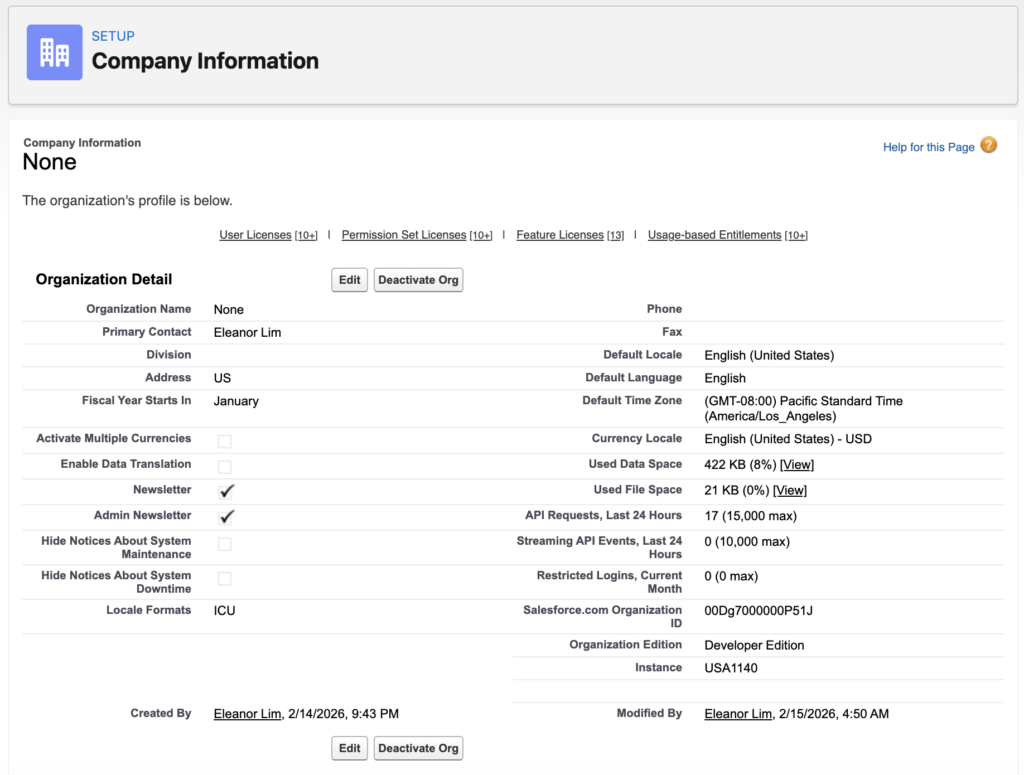
1. Solar components and systems supplier, Ursa Major Solar wants to ensure that the information is up to date on their Company Information page in Salesforce. Which set of information can an administrator specify in the Company Information page?
Setup > Company Settings > Company Information
2. Ursa Major Solar wants to ensure that all of its locale settings are up to date and consistent in the Salesforce system. The administrator is going through the process of making updates and configuring parameters for this information. Which two sets of parameters are configured using Locale settings?
Locale Settings
Setup > Company Settings > Company Information
Default Locale
Default Language
Default Time Zon
Currency Locale
User Locale Settings
Setup > Users > [User record] > Language & Time Zone
⭐️ There’s no literal First/Last Name Format field, but First/Last Name format is determined by the Locale setting.
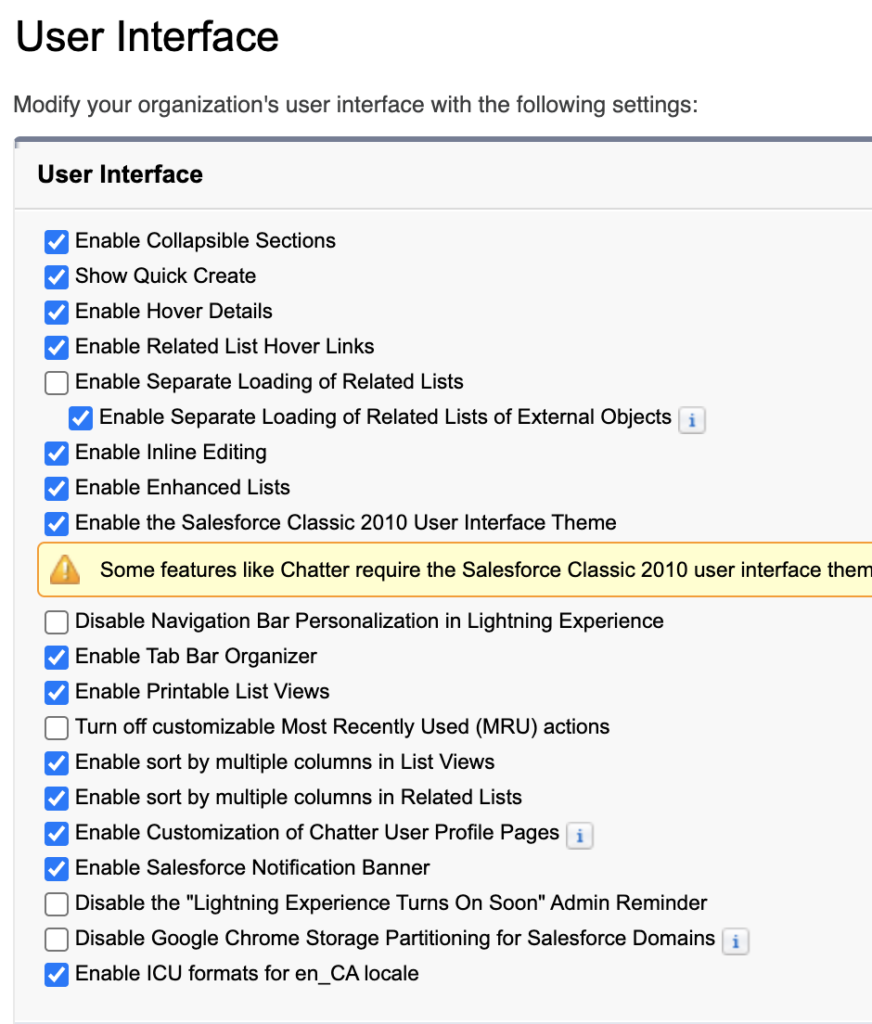
3. The VP of sales has changed the naming convention for opportunities to make it more uniform across the company. The sales manager wants to update multiple opportunity names for his sales team in Europe using his “Team Europe” list view in Salesforce. Which two user interface settings should be used to allow users, with all required profile permissions, to edit records in List Views?
Setup > User Interface > User Interface
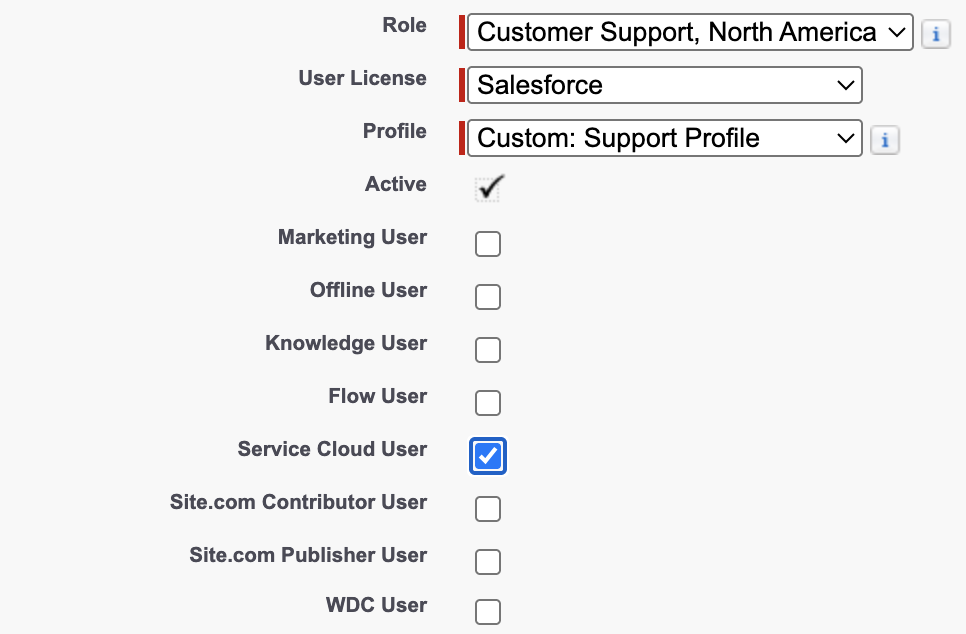
4. A new hire at Ursa Major Solar has joined the customer service team to interact with customers and handle cases. This user needs access to the Service Console to manage the cases and customer information. What should an administrator do to assign a Service Cloud user license to a new user?
Setup > Users > [User]
Role: Customer Support
User License: Salesforce
Profile: Custom: Support Profile
✅ Service Cloud User
Because, Customer Service Profile is not a Default Profile in Salesforce, Admin has to add a custom profile if it’s needed
5. Ursa Major Solar, a medium-size, Southwest-based supplier of solar components and systems, is growing internationally. An administrator receives details of a new hire in the Tokyo office who requires access to the Salesforce organization. Which two requirements should the administrator consider when creating a new user in a production Salesforce org?
6. A new employee is trying to login to Salesforce, but is having trouble and getting login error messages. He reaches out to the Salesforce admin for help. What should the administrator do first to troubleshoot login error messages?
Ask for the exact error message
Check Login History in Salesforce
Setup > Users > Login History
Login failed: Invalid username or password
Login blocked by IP restrictions
User is inactive
Verify user account settings
Confirm that the user is active.
Check profile login IP restrictions and login hours.
Ensure the user has been assigned the correct profile or permission set.
Reset password if needed
Setup > Users > [User] > Reset Password
Consider multi-factor authentication (MFA)
7. The administrator is notified that one of Ursa Major Solar’s employees is going on leave for a few weeks. Ursa Major Solar does not want the employee logging in to Salesforce while on leave. What should the administrator do to prevent a user from logging into Salesforce temporarily?
Setup > Users > [User] > Freeze버튼
Freezing is temporary, safe, and preserves all user data, whereas deactivation is more permanent and can disrupt workflows.
8. The administrator is asked to deactivate the Salesforce user account for an employee who has recently left the company. When a user account is deactivated, what happens to the associated license?
해당 User를 Unassign해도 License가 자동으로 없어지지는 않는다. 그냥 라이센스가 붕떠있을 뿐이다. 그렇겠지..그렇게 해야 Salesforce가 계속 돈을 받을 테니까…
9. The Executive Team at Ursa Major Solar is exploring ways to increase protection of the organization’s Salesforce data from unauthorized access. It has been proposed to leverage the Trusted IP Ranges feature. What is a benefit of entering Trusted IP ranges in the network access section?
Trusted IP Range 바깥의 IP에서도 로그인 되긴 된다. 다만 ⭐️본인인증을 추가로 해야할 뿐인다.
10. The password policy in Ursa Major Solar’s org shows that the length of time until passwords expire is 60 days. However, sales reps are complaining that their passwords expire every 30 days. Where should the system administrator change the password expirationperiod for the sales rep users?
> Password Policies > User passwords expire in: 60 days > Save
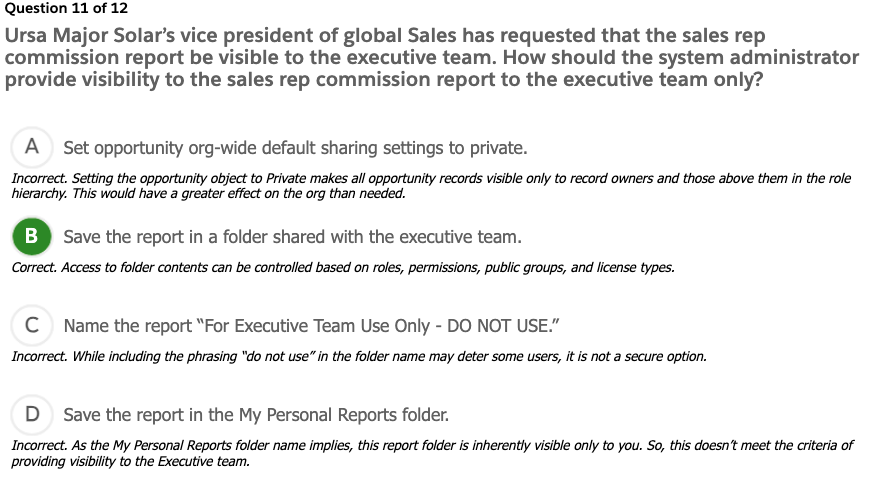
11. Ursa Major Solar’s vice president of global Sales has requested that the sales rep commission report be visibleto the executive team. How should the system administrator provide visibility to the sales rep commission report to the executive team only?
Put the report to the folder where the executives can access.
이거 이렇게 해서는 안되겠네..그냥 Profile들어가서 죄다 봐야할거 같은데…뭐가 엄청 많아…
Exam Topic Flashcards
Salesforce users at Ursa Major Solar complain that global search returns too many records. Which two configurations should an administrator perform to help users manage search results?
filter, access permission?
Specify the Search Filter Fields for the object’s search layout. Reduce the number of records displayed for each object in the Search Results page.
List View
A list of records that meet specific filter criteria
What are two reasons a user cannot be deactivated?
It’s hard to reactivate, The contents that the user owns are disabled
The user is the recipient of workflow email alerts. The user is a customer communityadministration.
User License
Salesforce License that can be assigned to the users.
They can be assigned based on their roles.
A user license determines the baseline of features that the user can access. Every user must have exactly one user license. You assign user permissions for data access through a profile and optionally one or more permission sets.
Permission Set
Group of the permissions who have same permission
Permission Set Group is the people
A permission set is a collection of settings and permissions that give users access to various tools and functions. The settings and permissions in permission sets are also found in profiles, but permission sets extend users’ functional access without changing their profiles. 권한 세트의 설정 및 권한은 프로필에도 있지만, 권한 세트를 사용하면 프로필을 변경하지 않고도 사용자의 기능적 접근 권한을 확장할 수 있습니다.
Profile
One user can have only one profile. Every user must have a profile. Profile is a default permission set of the user’s role.
Defines how users access objects and data, and what they can do within the application. When you create users, you assign a profile to each one.
How can a system administrator discover whoadded a field to the account page layout?
System log?
Use the Setup Audit Trail.
Setup > Security > Setup Audit Trail
Salesforce에서 관리자(Admin)가 Setup에서 변경한 내역을 추적하는 기능
Setup 설정 변경 내용
누가 변경했는지 (User)
언제 변경했는지 (Date/Time)
무엇을 변경했는지 (Action)
예시
Password Policy 변경
Validation Rule 수정
Profile 권한 변경
UI에서 최근 20개 변경 사항
CSV로 최대 6개월치 다운로드 가능
System Administrator가 주로 쓰고
보안 감사 / 컴플라이언스 대응용
Ursa Major Solar uses a private sharing model for cases. Each product line has several product specialists who want to have visibility to all cases involving their product line. How should the administrator meet this requirement? 제품라인마다 몇명의 스페셜리스트가 있고, 그들의 제품라인에 대한 케이스만 보려면?
Create a predefined case team for each group of product specialists and assign the team using Case Assignment Rules. Public Group: A public group is a set of users. It can contain individual users, other groups, the users in a particular role or territory, or the users in a role or territory plus all of the users below that role or territory in the hierarchy.
Create a Public Group for each product line
Setup > Public Groups > New
Label: Product Line 1 Specialists
Group Name: Product_Line_1_Specialists
Search: Users
Seleted Members
User: Eleanor Lim
User: Integration User
Create a Case Sharing Rule
Setup > Sharing Settings > Case Sharing Rules
Label: Product Line 1
Rule Name: Product_Line_1
Rule Type
✅ Based on criteria
Criteria
Field: Product Line
Operator: equals
Value: 1
Share with: Public Group > Product Link 1 Specialists
Case Access: Read Only
Organization-wide Sharing Default (OWD)
It’s company wide default setting
Defines the default access level for an object’s records with organization-wide sharing settings 각 오브젝트에 대한 기본 접근 권한 설정
Can be set separately for custom objects and many standard objects, including assets, campaigns, cases, and accounts and their contracts
10. Customer only for Closed Won
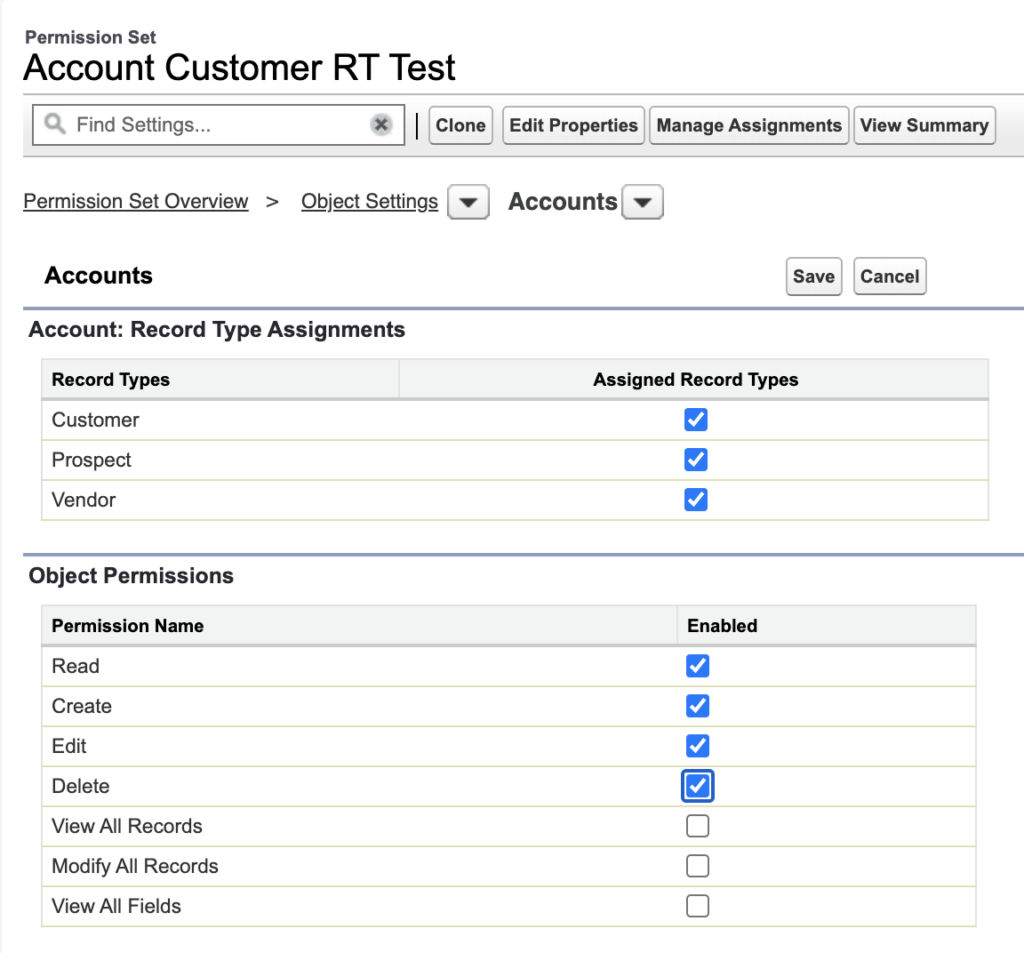
Ursa Major Solar has 3accountrecord types: Prospect, Customer, and Vendor. The Customer record type is only for accounts that have a Closed Won opportunity. How should a system administrator prevent users from selecting the Customer record type when they create new account records?
어떤 회사가 Account Type이 3가지가 있는데 Customer타입으로 등록되려면 그 회사의 Opportunity가 Closed Won되어야만 해당 회사의 Account Type을 Customer로 변경할 수 있다. 어떻게 하면 아무 Account나 Customer로 Type을 변경하지 못하게 막을수 있을까? // 새로운 Account를 생성할때 Record Type으로 Customer를 선택하지 못하게 하려면, // 기본적으로 Record Type에 Customer를 옵션으로 넣지 않고, // 조건이 충분되는 상황에서만 Record Type에 Customer를 끼워넣는다.
Remove the Customer record type as an Assigned record type in the users’ profiles and permission sets.
Account > Record Type = [Prospect|Customer|Vendor]
Opportunity > Stage = [Prospecting|…|Close Won]
옵션 1) Account생성시 Customer를 안보이게 하기
1️⃣ Records
Record Type이 없으면 Record Type Settings자체를 할 수가 없으니까 Account Object에 Record Type 3개 입력
Setup > Object Manager > Account > Record Types > New
Label:
Prospect
Customer
Vendor
✅ Active
2️⃣ Remove Customer from Profile
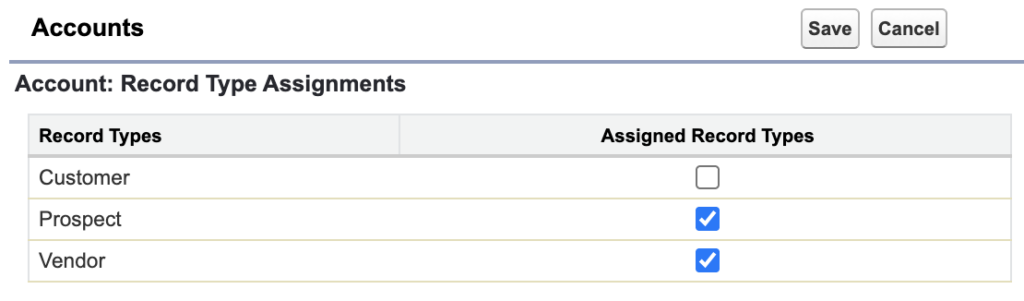
누구에게 해당 기능을 제공할 것인가? Profile.Standard User 그렇다면, Profile에서 Standard User에게 Account의 Record Type를 Customer를 뺀 두개만 보이도록 설정
Setup > Profiles > [Standard User] > Record Type Settings > Accounts > Edit Setup > Profiles > [System Administrator] > Record Type Settings > Accounts > Edit * Customer는 반드시 Available Record Types에 있어야 한다.
저장하면 이렇게 두개만 나오게
확인은 Account를 생성해보면 된다.
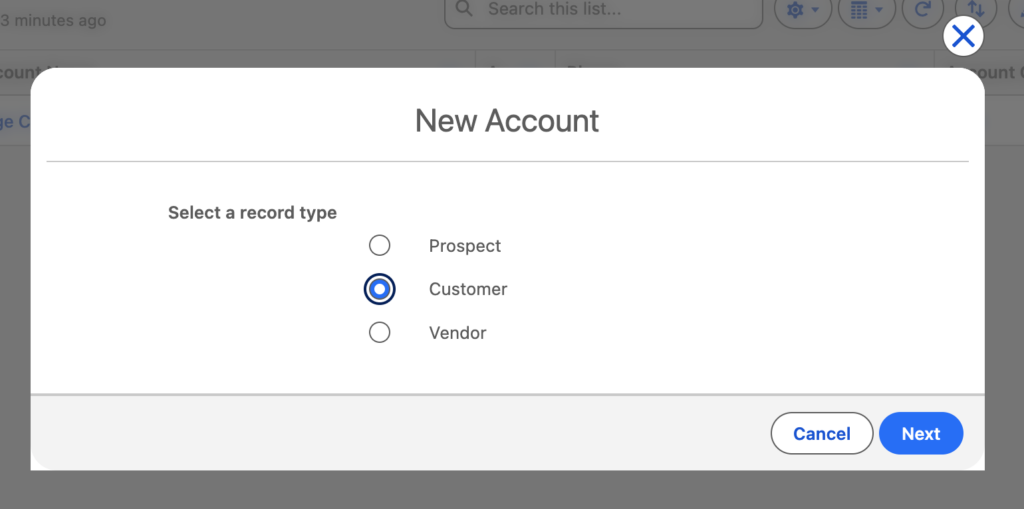
App Launcher > Accounts > New
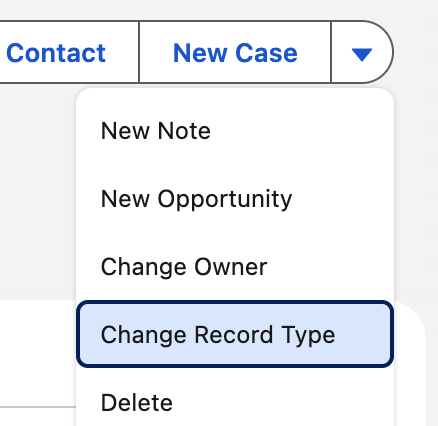
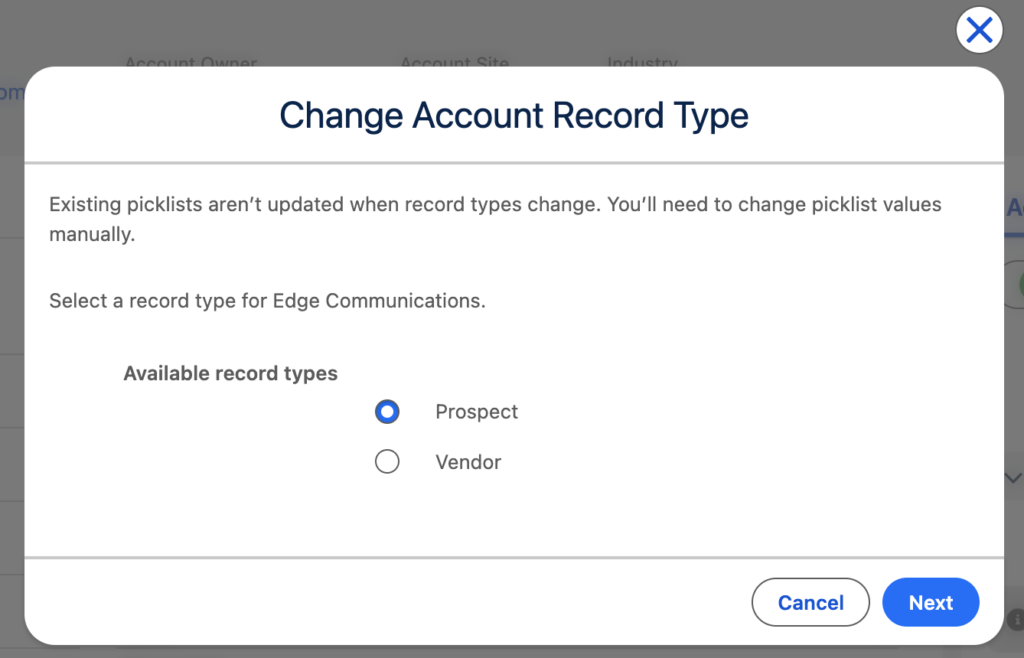
App Launcher > Accounts > [Account] > Change Record Type
클릭하면 팝업뜨고, 여기도 두개만 보임
3️⃣ Remove Customer from Permission Set
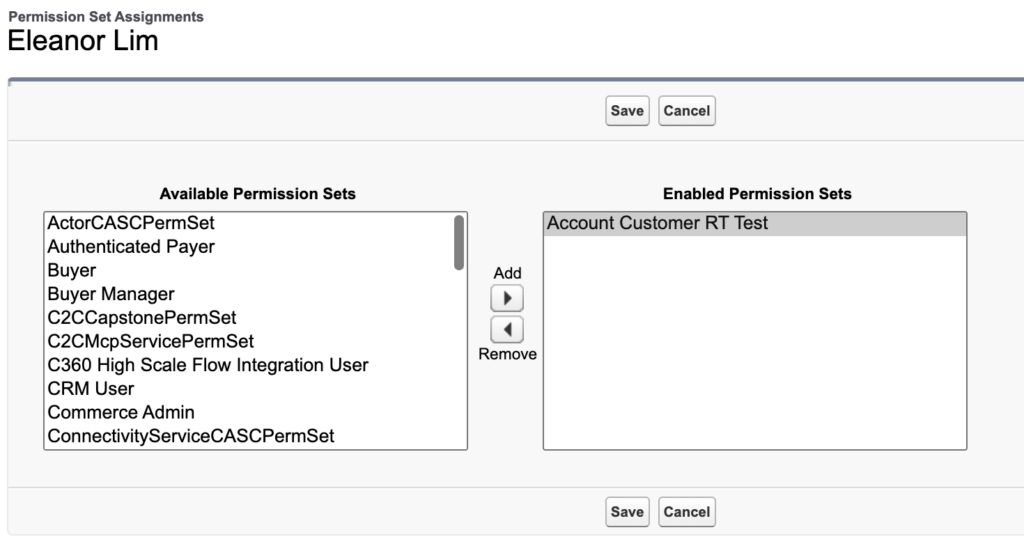
Customer가 Profile에서 제거되었어도, Permission Set에 있으면 나타날거임 할당받은 여러개의 권한 중에 한개라도 Customer가 있으면 Customer가 나타남 그래서 해당 유저가 할당받은 Permission Set에서도 동일하게 처리를 해주어야함
Profile에서 해당 유저의 Profile의 Record Type Settings > Account를 2개로 제한해도, 해당 유저가 Record Type 3개를 허용하는 Permission Set에 assign되어 있다면, Account를 생성할때 Record Type이 3개가 보인다.
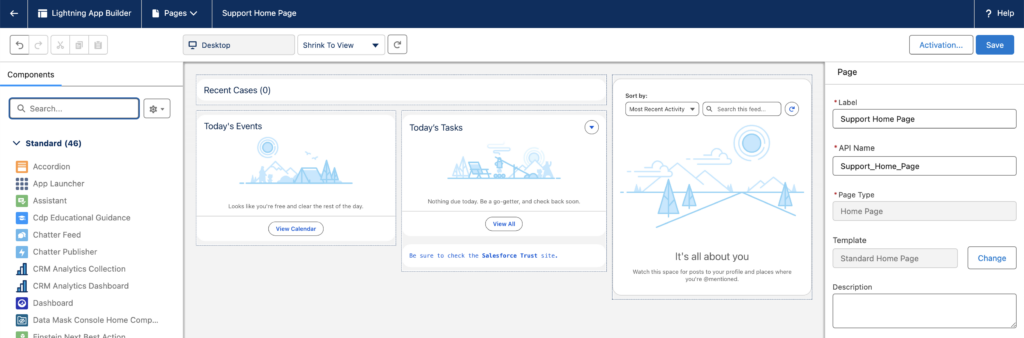
해당페이지가 Lightning Page로 등록이 되어 있다면 아래의 경로를 통해 Lightning App Builder페이지를 열수 있습니다.
Setup > Object Manager > Account > Lightning Record Pages > [Account Record Page] > Edit
하지만 아무것도 보이지 않는다면 해당 페이지를 만들어야해요.
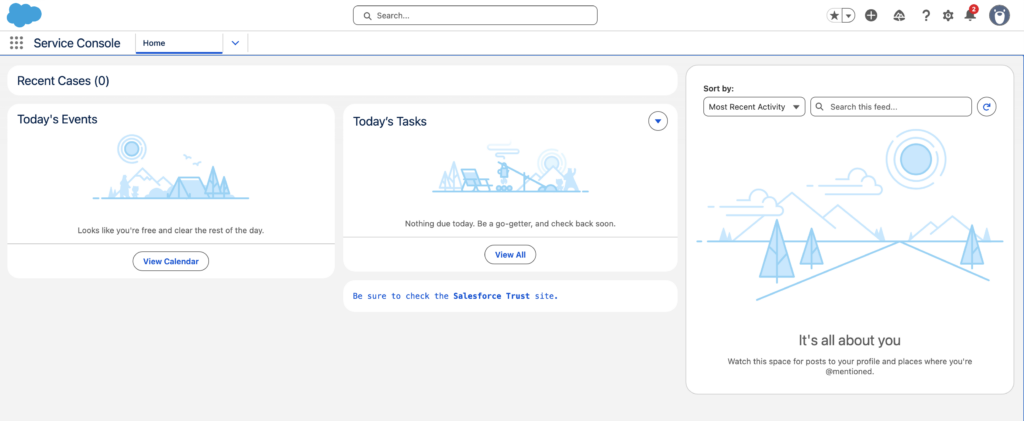
App Launcher > Sales > Accounts > [Account] > 최상단 톱니(우리가 Setup으로 갈때 쓰는 그 톱니임) > Edit Page
그러면 Lightning App Builder가 열리는데 여기보면 우측 패널에 Page정보를 저장하는 부분이 있습니다.
Label: Account Record Page
API Name: Account_Record_Page
Save
Action Button 삽입
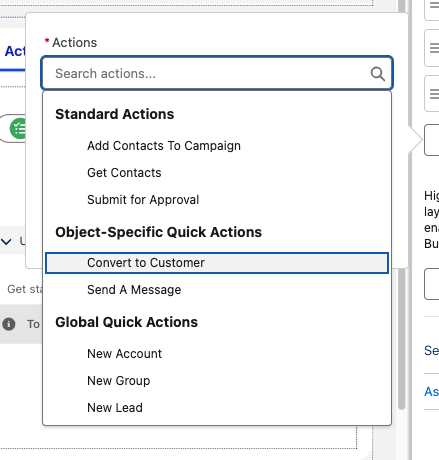
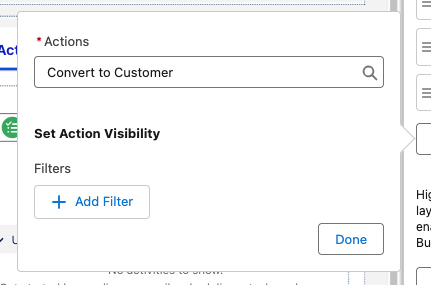
Account상세페이지에 Convert to Customer버튼을 넣을 건데요. 이 버튼은 Closed Won이 있을때만 보이도록 할거에요. 중앙페널 윗쪽에 Highlights Panel (페이지가 크게 3개로 나누는데 그중 윗부분) 선택하시면 우측에 속성창이 보입니다.
Dynamic Action을 넣으려면 Upgrade를 해야하거든요.
우측 속성패널에 Upgrade to Dynamic Actions: You can now configure dynamic actions for the highlights panel in the lighting app builder라고 안내되어 있는곳 밑에 Upgrade Now버튼을 클릭
Customer Record Type URL: https://cunning-badger-897lvs-dev-ed.trailblaze.my.salesforce-setup.com/lightning/setup/ObjectManager/Account/RecordTypes/012g7000000AveXAAS/view
권한 오류
INSUFFICIENT_ACCESS_ON_CROSS_REFERENCE_ENTITY An operation affects an object that the specified object cross-references, but the logged-in user doesn’t have sufficient permissions on the cross-referenced object. For example, a logged-in user attempts to modify an account record, and the update creates a ProcessInstanceWorkitem. If the user doesn’t have permission to approve, reject, or reassign the ProcessInstanceWorkitem, this exception occurs.
Profile에서 Selected Record Types에 들어가있지 않은 Record Type이나 Permission Set에서 Assigned Record Types에 선택되지 않은 Record Type은 UI에서든, Flow에서든, API로든 어떤방식으로든 선택할 수 없다는게 Salesforce의 강한 규칙이다.
그러니 결국 화면에서는 안보여줬다가 액션버튼으로 허용을 하겠다는 꿈은 실현이 될 수 없는 꿈이었다는 거지
대안1: Record Type선택화면을 안띄우는 방법
Custom Account생성화면을 따로 만들어서 관리하는 방법이 있긴한데, 문제는 계속 따로 관리를 해주어야한다는 거지..엄청 귀찮은 일이야…관리포인트가 늘어나는건 난 반대야
>> 10번문제는 공부를 좀더 한 다음에 계속하는게 좋겠어 지금으로서는 내가 생각하는 이상적인 방안이 떠오르지가 않아
11. System Administrator Report Folder
11. A system administrator cannot share a report folder. What is a possible reason?
>> it’s because, a system admin has too much power, the normal users might not be able to access the folder that system admin shared.
The folder is private.
영어 번역에 살짝 문제가 있다. 이 문제는 시스템 어드민자격으로 리포트폴더를 공유하지 못하는 이유를 묻는것이 아니라, 어떤 시스템 어드민이 있는데, 어떤 리포트 폴더를 공유하지 못하고 있는 상황을 말하면서 왜 이 사람은 해당 폴더를 공유하지 못할까 이유를 물어보고 있는것이다. 시스템어드민임에도 불구하고 어떤 폴더를 공유할수 없다면 그 폴더는 Private이기 때문일것이다.
12. Sharing Rules
Give chosen users greater access by making automatic exceptions to your org-wide sharing settings. Use to extend sharing access to users in public groups, roles, or territories.
13. Role Hierarchy
By creating a hierarchy, you can grant permissions based on the hierarchical relationship.
Salesforce offers a user role hierarchy that you can use with sharing settings to determine the levels of access that users have to your Salesforce org’s data. Roles within the hierarchy affect access on key components such as records and reports.
Permissions come from: Profiles, Permission Sets. Role Hierarchy grants record access.
Provides record access based on role levels
Permission = what you can do
Role hierarchy = which records you can see
Quiz
The Configuration and setup section makes up what percentage of the Platform Administrator Certification exam? A. 3% B. 5% C. 10% D. 15%
Which key topics are covered in the Configuration and setup section of the Platform Administrator Certification exam? A. Locale settings, Chatter, list views, and data loader B. Products, price books, web-to-case, and activities C. Search results, Chatter, opportunities, and campaigns D. UI features, company information, locale settings, and search results
Salesforce Certification Program participants should:
Use Salesforce-approved study materials available on Trailhead to prepare for your certification exam, including certification exam guides, trailmixes/trails, Trailhead Academy courses, and Trailhead LIVE sessions
Collaborate with other Trailblazers in the Trailblazer Community by joining a community group and finding a study buddy and/or mentor 지금보다는 코스를 다 끝내고 찾는것이 더 현명함
Consequences for violating the program agreement include but are not limited to:
Cancellation of upcoming and in progress certification exams
Suspension from earning or revocation of Salesforce Certifications
Removal from the Salesforce Certification Program and/or the Trailblazer Community
Maintain Your Certification
certified professionals must successfully complete release maintenance modules specific to their certifications once per year. You may view specific maintenance requirements here. If you don’t complete your maintenance modules by the completion deadline, your certifications will expire.
This module is focused on these key topics, with each topic covered in its own unit.
Configuration and setup 20%
Object Manager and Lightning App Builder 20%
Quiz
As a participant in the Salesforce Certification Program, what should you do to prep for exams? A. Study practice questions on a flashcard site you found on the internet. B. Use study materials found on Trailhead, like exam guides and Trailhead modules. C. Submit a case with the Certification Security Team if you see any activity that undermines exam security. D. Ask a friend for help answering specific exam questions. E. B and C
Which Platform Administrator Certification exam objective is weighted at 14%? A. Sales and marketing applications B. Data and analytics management C. Service and support applications D. Workflow/process automation
 to expand the window, then click anywhere in the window to close it. When you reach the end, you can review the answers or retake the questions.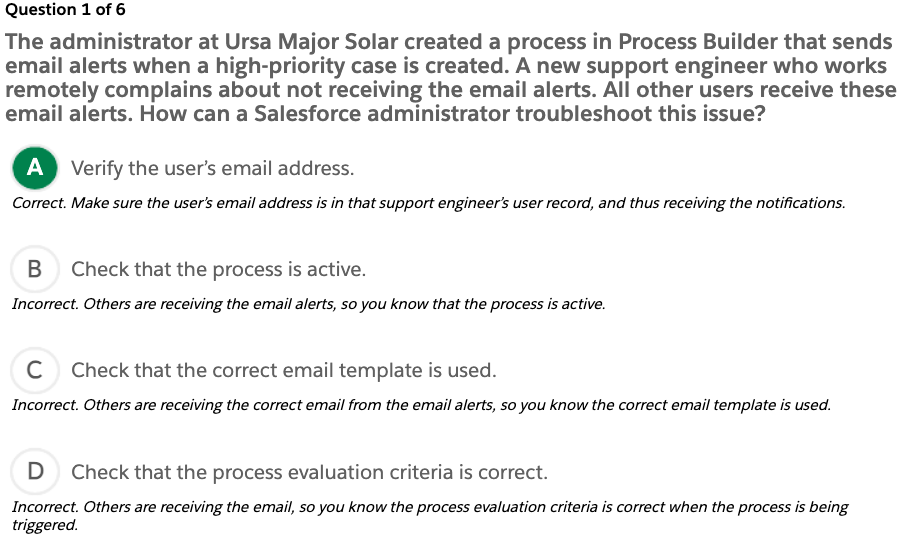
 to expand the window, then click anywhere in the window to close it. When you reach the end, you can review the answers or retake the questions.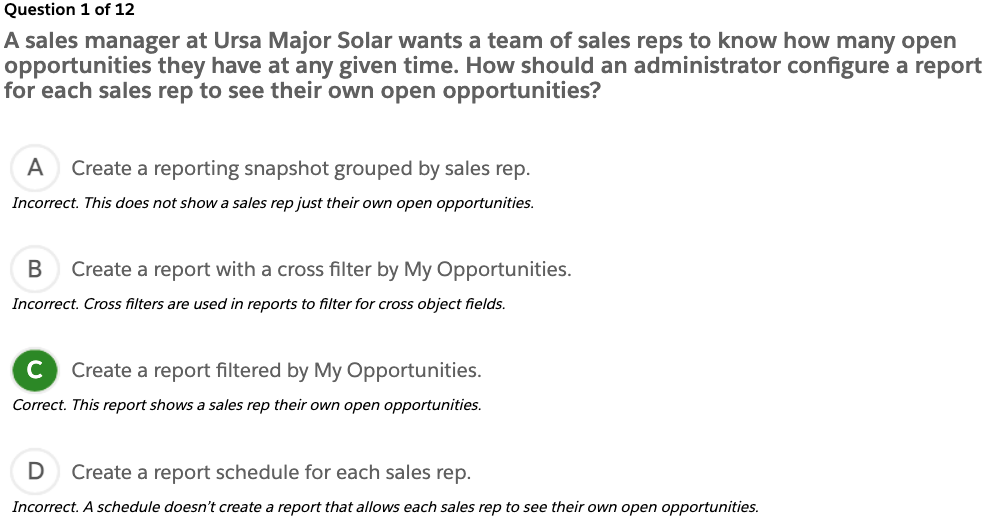
 to expand the window, then click anywhere in the window to close it. When you reach the end, you can review the answers or retake the questions.
 to expand the window, then click anywhere in the window to close it. When you reach the end, you can review the answers or retake the questions.
 to expand the window, then click anywhere in the window to close it. When you reach the end, you can review the answers or retake the questions.
 to expand the window, then click anywhere in the window to close it. When you reach the end, you can review the answers or retake the questions.