Admin Intermediate > Salesforce Mobile App Rollout > Roll Out the Salesforce App to Your Users
Before You Launch
you should do before your launch:
- Migrate, then test. If you migrated your mobile customizations from your sandbox to your production environment, test everything again to make sure the Salesforce app is working as expected.
- Control access. By default, all users have access to the Salesforce app. If you’re doing a phased rollout, define which employees can use the mobile app during this stage of your rollout. See Control Access and Security for the Salesforce Mobile App in Salesforce Help for details.
- Collect a baseline. Take an analytic snapshot of the metrics your company is using to define success. Then you can use that data as a baseline for measuring the business impact of your rollout. 성공이라 말할수 있는 지표가 필요해요. 새로운 버젼이 비즈니스에 미치는 영향 분석
- Take it to Chatter. Create a public, company-wide Chatter group where your users can ask questions about the mobile app and access training materials. Make sure your super users are engaged and ready to swarm on the questions that get posted in the group.
Ready… set… GO!
Motivate Users
During the launch event, you see a huge spike in logins and activity. but after the confetti(색종이조각) settles and the initial fanfare(과열, 과시) is over, you see a decline in usage.
출시 행사 기간 동안에는 로그인 횟수와 사용량이 폭발적으로 급증합니다. 하지만 축하 분위기가 가라앉고 초기 열기가 식으면 사용량이 감소하는 것을 볼 수 있습니다.
some ideas that might help you drive adoption:
- Produce helpful content. After the launch, continue to release short one-minute recorded screenshares that promote time-saving features available in the Salesforce app.
- Don’t stop marketing. Your mobile users will probably start telling you about moments when the Salesforce app saved the day. Share those mobile success stories on Chatter, including a photo of the user in action. Get a testimonial from a few executives as employees follow the example set by their leaders.
- Get organic exposure. Why take photos of your users when they’d be happy to do it themselves? It’s the selfie era! Have a contest on Chatter and ask mobile users to post photos of themselves using the app, with a prize for the most likes. Not only does that give your users a chance to shine, it also creates buzz about the mobile app.
- Make it a game. Ignite some friendly competition among your users by running a login report, and then doling out cool prizes to users with the most mobile logins. Create a dashboard for the contest leaderboard.
- Use sales as an incentive. If you rolled out the Salesforce app to your sales team, you can use the current sales contest or selling initiative to drive mobile adoption. Create a dashboard that shows how the sales reps are performing against their goal, and the reps will be motivated to check the dashboard in the Salesforce app.
Collect Feedback
listen to your users. collect feedback about overall satisfaction and any pain points.
some ideas for gathering feedback from users:
- Take it to Chatter. Use the Chatter group you created to support your mobile rollout. Employees can post ideas and suggestions there.
- Make it easy. Allow users to provide input directly from the Salesforce app. You can use the standard case object or implement your own solution, like a Mobile Feedback custom object, a quick action, or a Visualforce page.
- Provide multiple feedback options. Send out surveys, host open forums, or conduct simple Chatter polls.
- Keep in contact. Meet with your super users regularly to gather valuable insights from the field.
Also, don’t forget to update your training programs for new hires! Incorporate the Salesforce app into your existing Salesforce onboarding activities.
Measure Adoption and Business Impact
review your metrics and figure out exactly how you want to measure them.
If your metrics include employee satisfaction, you can gather data using some of the methods we already discussed, like surveys, forums, and polls. For other types of metrics, create reports and dashboards to track your results. Take reporting snapshots and start comparing the data month after month to see if there are any increases.
Deliver an Executive Summary
return on investment (ROI)
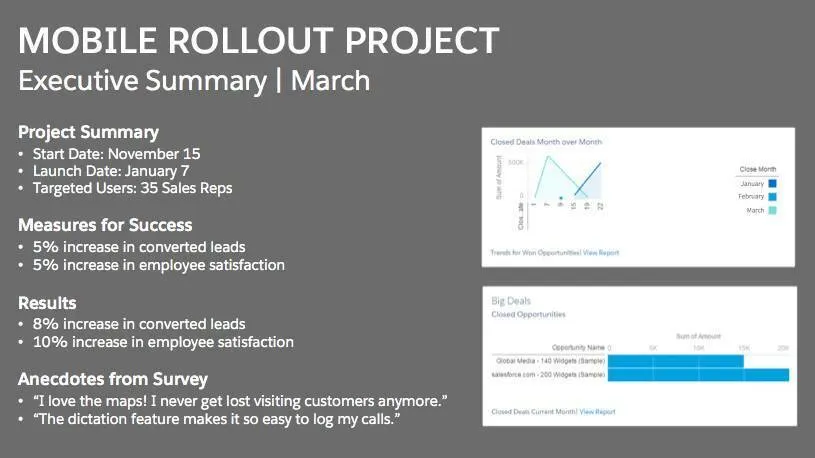
When you’re preparing an executive summary, follow these best practices:
- Keep it to 1-2 pages maximum.
- Showcase metrics and results.
- Highlight any noteworthy anecdotes.
- Share lessons learned.
- Note planned next steps.
Keep Up the Momentum
- Make sure you prioritize your backlog of mobile use cases and enhancements
- revisit the backlog as often as possible to see what other mobile goodies you can roll out to your users
- keep up with the Salesforce app releases to see all the cool new features you can implement
- check out the Mobile Strategy Development
Quiz
- You can collect feedback from users by:
A. Asking their managers
B. Sending out surveys or encouraging users to post in Chatter
C. Creating a Mobile Feedback object that’s accessible in the Salesforce app
D. A and B
E. B and C - When you’re preparing your measures for success, don’t forget:
A. Your ruler
B. To work by yourself on key metrics
C. To take a baseline before you launch the Salesforce app
D. That using specific metrics isn’t recommended - How do you keep up the momentum after your initial mobile rollout?
A. Build everything your users request.
B. Continually evaluate and prioritize your backlog of mobile enhancements and use cases based on feedback from users, executives, and stakeholders.
C. Don’t worry about keeping up the momentum. After the initial rollout, your job is done.
D. Let your executive sponsor decide which mobile features and use cases are a priority.
Vocabulary
- Don’t jump the gun: 성급하게 판단하지 마세요
- Bask in the Glory: 영광을 만끽하세요
- baseline: 기준선
- confetti: 축제에 사용하는 색종이 조각
- fanfare: 과열, 과시
- cultivate: 기르다