Admin Beginner > Lightning Experience Customization > Empower Your Users with Quick Actions
Overview
Account를 살펴보다가 갑자기 해당 계정에 대한 Energy Audit정보를 입력하고 싶을 수도 있잖아요. 그럴때 Account상세화면에 New Energy Audit버튼이 있으면 얼마나 좋을까요.
Create an Object-Specific Action
- Setup > Object Manager > Account > Buttons, Links, and Actions
- New Action
- Action Type: Create a Record
- Target Object: Energy Audit
- Label: New Energy Audit
- Save
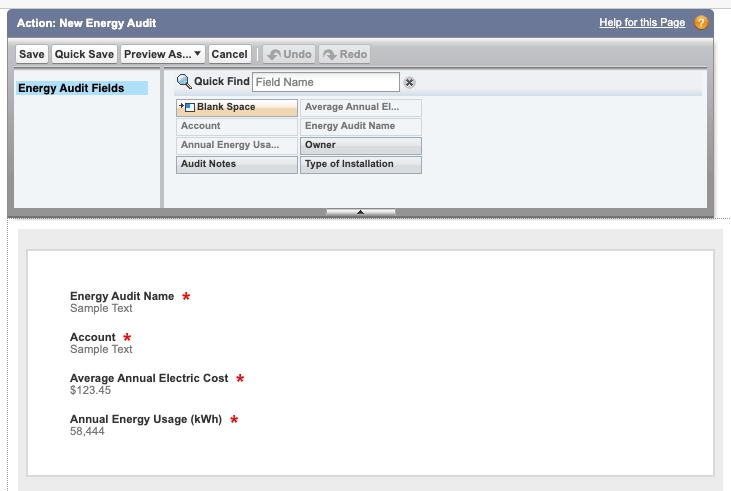
Action을 저장하면 아래와 같이 Action Layout을 변경할 수 있는 화면이 뜹니다. 우리는 그대로 쓰겠습니다.
Add an Object-Specific Action to a Page Layout
- Setup > Object Manager > Account > Page Layouts > Account Layouts > Mobile & Lightning Actions
- 윗줄에 New Energy Audit버튼을 찾아서 Quick Actions in the Salesforce Classic Publisher섹션에 끌어다 놓으세요.
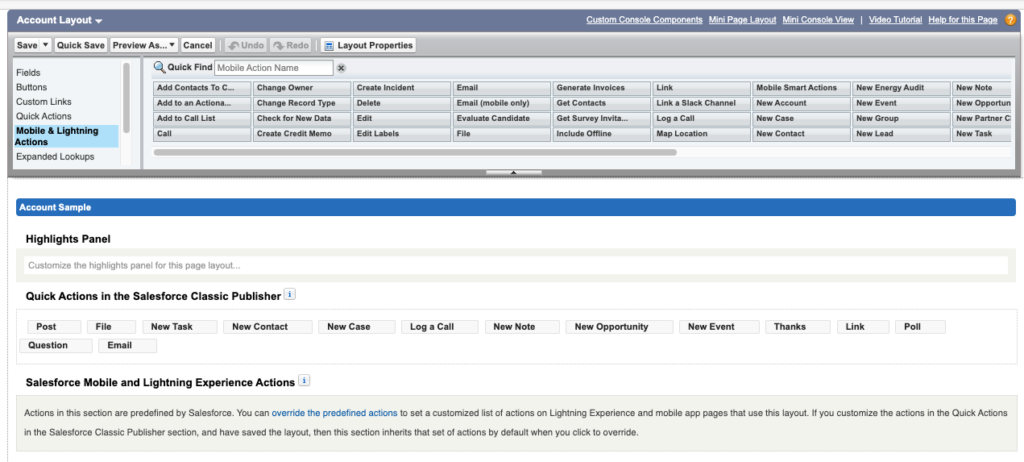
문제가 생겼습니다. New Energy Audit버튼을 Salesforce Mobile and Lightning Experience Actions로 끌어다 놓으려니까 안끌어와지고 아래의 메세지가 떠있습니다. 이 말은 지금은 Salesforce가 기본 액션 세트를 강제로 쓰고 있어서, 우리가 직접 넣을 수 없다는 말입니다.
Actions in this section are predefined by Salesforce. You can override the predefined actions to set a customized list of actions on Lightning Experience and mobile app pages that use this layout. If you customize the actions in the Quick Actions in the Salesforce Classic Publisher section, and have saved the layout, then this section inherits that set of actions by default when you click to override.
화면에 override the predefined actions부분이 링크로 되어있는데 그 링크를 클릭해보세요

기본액션세트로 들어가 있던 모든 버튼들이 변경할 수 있는 상태로 바뀝니다.
아래는 불필요한 버튼들 입니다. 팔레트로 드래그앤 드롭하셔서 위로 다시 보내버리세요.
- Thanks
- Question
- Sharing
- Change Record Type
- Get Contacts
- Check for New Data
- View Partner Scorecard
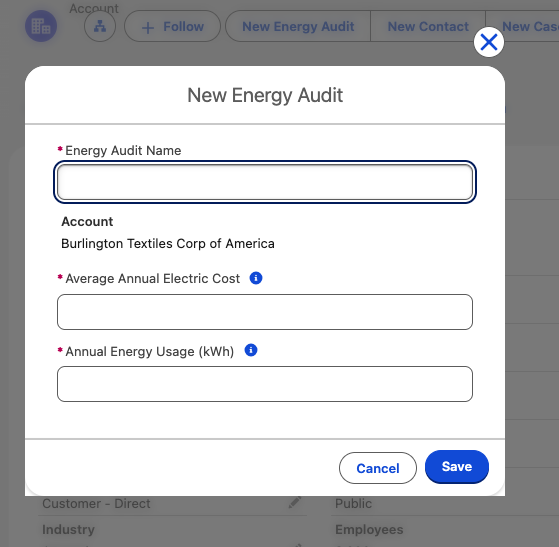
그리고 아까 만든 New Energy Audit을 목록에 추가한뒤 Save버튼을 눌러 저장합니다. Sales > Acccounts > 레코드 페이지를 보시면 New Energy Audit버튼이 상단에 보입니다.

버튼을 클릭하면 팝업이 떠서 화면을 이동하지 않고도 Energy Audit레코드를 입력할 수 있습니다.
Create a Global Action
영업팀에서 요구사항이 왔습니다. Salesforce 어디세서든지 캠페인을 만들수 있는 작업을 만들어 달라는 요청입니다. 특정 Object에서만 보이는게 아니라 전체적으로 보이는 Action이라면 Global Action으로 만들어야겠네요!
- Setup > Home > Quick Find > Global Actions
- New Action
- Action Type: Create a Record
- Target Object: Campaign
- Label: New Campaign
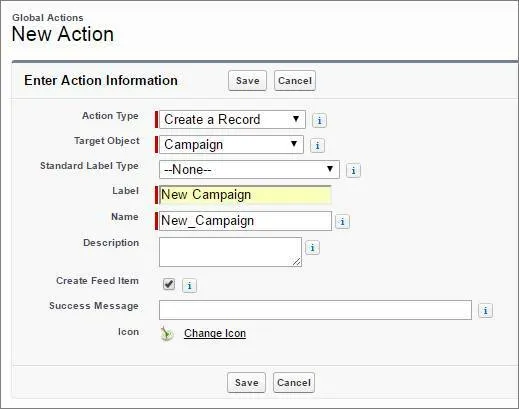
- Save
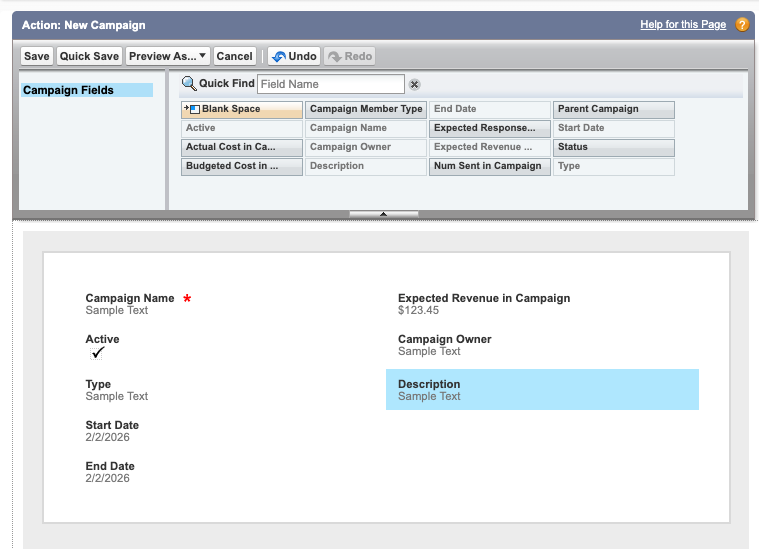
- 필드정리
- Parent Campaign 삭제
- Expected Revenue in Campaign 추가
- Campaign Owner 추가
- Save
Add a Global Action to the Global Actions Menu
- Setup > Home > Quick Find > Publisher Layouts
- Click “Edit Global Layout” button
- Click
 on “Salesforce Mobile and Lightning Experience Actions” Section
 - Click “Mobile & Ligtning Actions” menu
- New Campaign버튼을 “Salesforce Mobile and Lightning Experience Actions”섹션으로 끌어다 놓는데 이때 New Event뒤에 놓도록 합니다.
- Save
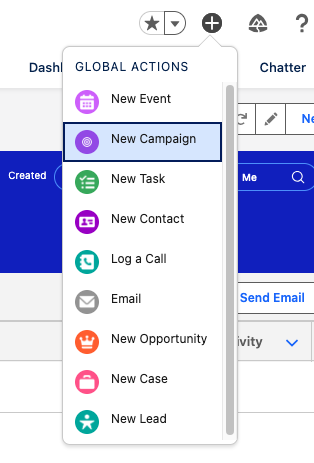
글로벌 액션은 최상단 메뉴에 있습니다. 화면을 새로고침 하고 최상단 메뉴의 +버튼을 눌러서 New Campaign이 있는지 확인합니다.
Quiz
Second attempt earns 50 points. Three or more earns 25 points.
- Custom Action은 사용자들에게 어떻게 도움이 되나?
- Custom Obect를 생성하게 허용한다
- 레코드를 보거나 수정할 수 있는 더 많은 방법을 제공한다.
- 회사내부 정보를 가지고 더욱 신속하게 작업할 수 있게 만들어준다.
- A & B
- B & C (정답)
- object-specific actions과 global actions의 가장 큰 차이점?
- object-specific actions은 다른 레코드와 자동적인 관계가 형성되는데 반해 global actions는 그렇지 않다. (정답)
- global actions는 Salesforce외부에서 실행되고 object-specific actions만 Salesforce내부에서 실행된다. (두번째 답)
- object-specific actions는 actions을 오직 특정 objects에만 실행한다. (첫번째 답)
- object-specific actions은 salesforce의 어느곳에서나 실행할 수 있다.
+25점 획득 😭