Study for the Administrator Certification Exam > Configuration and Setup (15%) > User Management > Control What Your Users Can Access
Introduction to Data Security
- provide just the right level of data access
- You can configure access at the level of the organization, objects, fields, or individual records.
- without having to specify permissions for each user individually
- for more Data Security
Levels of Data Access
4개의 단계로 이루어진 접근레벨
1. Organization
조직레벨의 접근은 회사직원 이외의 사람들이 접근하지 못하도록 하는 로그인정책, 비번정책 등이 있다.
2. Objects
Permission sets and Permission set groups을 이용하여 Object에 접근할 사람들을 정의합니다.
3. Fields
permission sets을 이용하여 Field에 접근할 사람들을 정의합니다.
4. Records
레코드 접근에 영향을 주는 것들:
- role hierarchy
- sharing rules
- manual sharing
- other sharing
Permission Sets
- collections of settings and permissions
Create a Permission Set
Permission Set생성할때:
- Setup > Permission Sets > New
Object레벨의 접근권한을 설정할때는 생성한 Permission Set을 선택하면 Object Settings이 보이는데
- Setup > Permission Sets > [Permission Set] > Object Settings
그걸 클릭하면 모든 Object의 목록이 보이고, 그중 하나의 Object를 클릭하면, 해당 Permission Set의 현재 Object에 대한 접근 권한을 모두 볼수 있고, Edit버튼을 누르면 권한을 수정할 수도 있다.
App에 대한 접근은 App Permissions에서 정의할 수 있음:
- Setup > Permission Sets > [Permission Set] > App Permissions
Permission Set Groups
- Group of Permission Sets
- based on a job persona or role
- assign a permission set group to users
- check out Permission Set Groups
Mute Permission
Permission Set Group은 여러 Permission Set을 합친 거잖아? 그런데 문제는:
- 어떤 Permission Set에는 필요 없는 권한이 들어 있음
- 그룹에서 그 권한만 빼고 싶음
이럴 때 쓰는 게 Muted Permissions.
즉, 그 권한을 삭제하는 게 아니라 그룹 안에서만 비활성화
permission set group 생성:
- Setup > Permission Set Groups > New Permission Set Group
- Label: test permission set group
- Save!
- Permission Sets in Group > Add Permission Set
- ✅
HyperionCASCPermSet - Add!
- ✅
- Done!
Mute Permission생성:
- Setup > Permission Set Groups > Muting Permission Set in Group > New
- Label: test permission set group Muted
- Save!
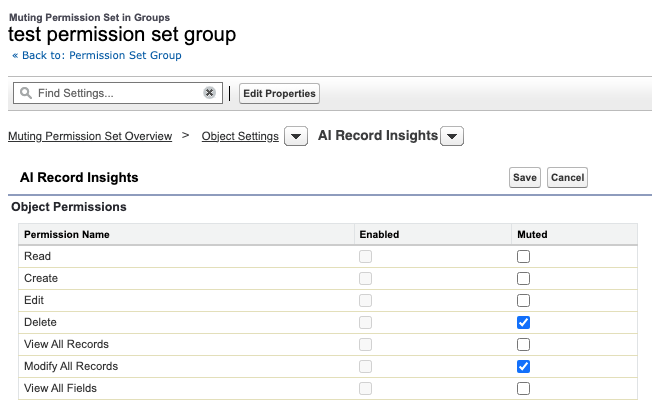
불필요한 권한만 Mute(끄기):
- Setup > Permission Set Groups > test_permission_set_group
> Muting Permission Set in Group > test permission set group Muted - > Object Settings > AI Record Insights > Edit
- Delete ✅ Muted
- Modify All Records ✅ Muted
- Save!
Permission set group에 사용자 배정하기:
- Setup > Permission Set Groups > test_permission_set_group
> Manage Assignments > Add Assignment- ✅ Ellie Howard
- ✅ Eleanor Lim
- Next!
- ✅ No expiration date
- Assign!
Organization-Wide Sharing Defaults
OWD를 설정시 고려할점:
- 해당 Object에 가장 권한이 없는 사용자는 누구인가?
- 이 사용자가 해당 Object의 레코드중에 보면 안되는게 있나?
- Yes – Sharing Model: Private
- No – 이 사용자가 Object의 레코드중에 편집하면 안되는게 있나?
- Yes – Sharing Model: Public Read-Only
- No – Sharing Model: Public Read/Write
| Field | Description |
|---|---|
| Private | Only the record owner, and users above that role in the hierarchy, can view, edit, and report on those records. |
| Public Read Only | All users can view and report on records but not edit them. Only the owner, and users above that role in the hierarchy, can edit those records. |
| Public Read/Write | All users can view, edit, and report on all records. |
| Controlled by Parent | A user can perform an action (such as view, edit, or delete) on a record based on whether he or she can perform that same action on the record associated with it. |
organization-wide sharing setting에서 어떤 Object를 Private이나 Read-Only로 주었다면 다음의 방법으로 추가 권한을 부여할 수 있습니다.
- role hierarchy
- defining sharing rules
- using other sharing features
위의 방법들은 권한을 추가적으로 부여할뿐, 갖고 있던 권한을 제한할 수는 없습니다.
Set Organization-Wide Sharing Defaults
- Setup > Sharing Settings > Edit
- Default Internal Access
select the default access you want to use - Grant Access Using Hierarchies
allow employees at higher levels in the role hierarchy to access records automatically
- Default Internal Access
for more, check out Data Security.
Hands-on Challenge
Your Challenge
Configure Object, Field, and Record Access
As part of your data access configuration, you must give your sales reps access to accounts. You plan to reuse the same permission set for users who’ll need greater access to accounts, so you’ll mute certain permissions for your sales reps using a permission set group.
You also need to configure your organization-wide defaults for accounts and opportunities so users only see the records they need to.
- Create a permission set:
- Label:
Account Access - API Name:
Account_Access - Add a description (We won’t check for this.)
- License: -None-
- Enable Account Object Permissions: Read, Create, Edit, Delete, View All Records, and Modify All Records
- Enable Account Field Permissions: Read Access and Edit Access for all fields
- Label:
- Create a permission set group and assign it to the user you created:
- Label:
Sales User - API Name:
Sales_User - Include the Account Access permission set that you created
- Create a muting permission set in the permission set group and name it
Sales User Muted(API Name:Sales_User_Muted) - Mute Account Object Permissions: Delete, View All Records, and Modify All Records
- Mute Account Field Permissions: Edit Access for the Annual Revenue and Customer Priority fields
- Assign the permission set group to the user you created in the previous unit
- Label:
- Configure organization-wide defaults:
- Account and Contract: Visible but not editable for all users.
- Opportunity: Visible only to record owners and users higher in the role hierarchy.
- Note: Wait for the updates to finish processing before checking this challenge.
풀이
Permission Set
- Setup > Permission Sets > New
- Label:
Account Access - API Name:
Account_Access - License: -None-
- Label:
- Save!
- Object Settings > Accounts > Edit
- Object Permissions
- Read ✅
- Create ✅
- Edit ✅
- Delete ✅
- View All Records ✅
- Modify All Records ✅
- Field Permissions
- ✅ Read Access
- ✅ Edit Access
- Object Permissions
- Save!
Permission Set Group
- Setup > Permission Set Groups > New Permission Set Group
- Label:
Sales User - API Name:
Sales_User
- Label:
- Save!
- Permission Sets in Group > Add Permission Set 버튼
- Check ✅ Account Access
- Add!
- Done!
- Back to: Permission Set Group > Muting Permission Set in Group > New
- Label: Sales User Muted
- API Name:
Sales_User_Muted
- Save!
- [Sales User Muted] > Object Settings > [Accounts] > Edit
- Object Permissions
- Delete ✅ Muted
- View All Records ✅ Muted
- Modify All Records ✅ Muted
- Field Permissions:
- Annual Revenue ✅ Edit Access Muted
- Customer Priority ✅ Edit Access Muted
- Object Permissions
- Save!
- Back to: Permission Set Group > Manage Assignments > Add Assignment
- ✅ Ellie Howard
- Next!
- ✅ No expiration date
- Assign!
OWD
- Setup > Sharing Settings > Edit
- Account and Contract
- Default Internal Access: Public Read Only
- Default External Access: Public Read Only
- Opportunity
- Default Internal Access: Private
- Default External Access: Private
- ✅ Grant Access Using Hierarchies
- Save!
- All sharing rules will be recalculated based on the new defaults, which may require significant time. The original values will be displayed until the operation completes. An email notification will be sent upon completion. Do you want to continue?
- OK!
- Account and Contract