Admin Intermediate > Data Security > Control Access to Records
Overview
이번 시간에는 레코드 단위로 접근을 제한 하는 방법에 대해서 알아보도록 하겠습니다.
Record-Level Security
To control data access precisely, you can allow particular users to view specific fields in a specific object, but then restrict the individual records they’re allowed to see. Record access determines which individual records users can view and edit in each object they have access to. First ask yourself these questions:
데이터 액세스를 정확하게 제어하기 위해 특정 사용자가 특정 개체의 특정 필드를 볼 수 있도록 허용하되, 볼 수 있는 개별 레코드를 제한할 수 있습니다. 레코드 액세스를 통해 사용자는 액세스할 수 있는 각 개체에서 보고 편집할 수 있는 개별 레코드를 결정할 수 있습니다. 먼저 다음 질문을 해보세요.
데이타접근을 좀더 세부적으로 제한하는 방법에는 특정 사용자가 특정 개체나 그 개체의 특정 필드를 볼 수 있도록 허용을 하는 방법에 대해서 배웠는데요, 이제는 레코드 마저도 어떤 레코드를 볼 수 있게 할지 편집은 하게 할지 말지를 결정할 수 있습니다. Record Access를 통해서 어떤 사용자가 어떤 데이타를 보고, 또는 편집할 수 있는지 등을 결정하게 됩니다.
레코드 단위 접근제한 방법
레코드 단위로 접근을 제한 하는 방법에는 4가지가 있습니다:
- Organization-Wide Defaults (OWD)
- 조직내 모든 사용자에게 부여되는 기본적인 접근권한입니다.
- 보통 가장 제한적으로 설정하고 필요에 따라 권한을 할당하는 식으로 관리합니다.
- Role Hierarchy (역할 계층)
- 회사 조직 구조처럼 상사하 아랫사람의 레코드를 자동으로 볼수 있게 합니다.
- Sharing Rules (공유규칙)
- 특정 사용자 그룹이나 역할에 대해 레코드를 자동으로 공유합니다.
- OWD에 권한이 없어서 접근이 안될때 권한을 부여하기 위해 사용합니다.
- Manual Sharing (수동공유)
- 레코드를 소유한 사람이 다른 사용자에게 특정 레코드를 공유할 수 있습니다.
- 규칙에 따라 자동으로 공유가 되는 것이 아니고 특별한 경우에 예외적으로 사용하는 방법입니다.
Org-Wide Sharing Defaults
- Setup > Quick Find > Sharing Settings
- Organization-Wide Defaults 안에 보면 Edit버튼이 있습니다. 클릭하시만 아래와 같은 화면이 뜨는데요. 여기에서 Default Internal Access와 Default External Access를 설정하실 수 있으세요.
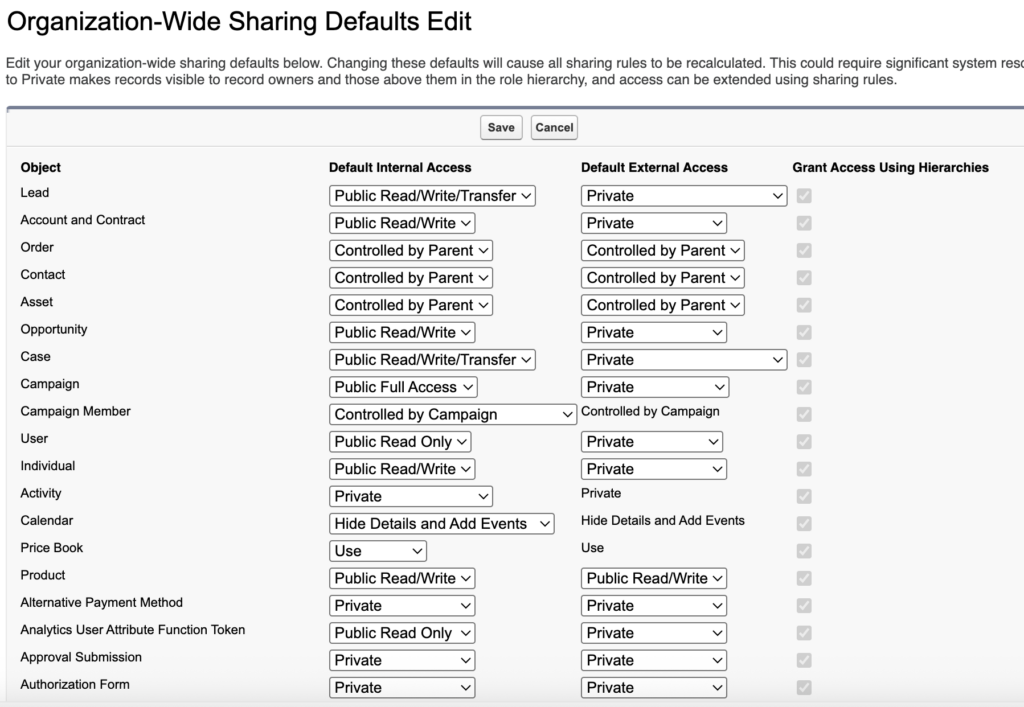
- 아래처럼 변경해주세요:
- Default Internal access
- Position: Public Read Only
- Candidate: Private
- Job Application: Private
- Review: Private
- Default external access
- Position: Private
- Candidate: Private
- Job Application: Private
- Review: Private

- Default Internal access
- Save
참고로, OWD에서 Default로 선택할 수 있는 선택지는 객체마다 다를 수 있습니다. 어떤 객체는 더 많은 옵션을 가지기도 하고 어떤 객체는 아예 Controlled by Parent 같은 특수 옵션이 있기도 하고 어떤 표준 객체는 Private를 지원 안 할 수도 있고 어떤 건 Public Read Only만 있기도 합니다. Custom Object는 OWD옵션이 항상 3개(Private, Public Read Only, Public Read/Write)로 고정입니다. Controlled by Parent나 Public Read/Write/Transfer같은 옵션은 표준객체에만 제공되는 옵션입니다.
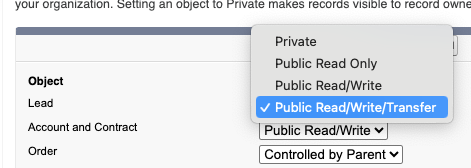
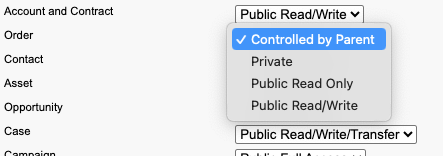
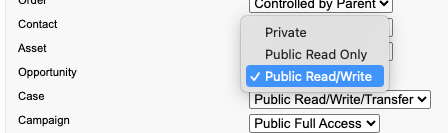
Role Hierarchy를 통해 상위 역할(매니저)는 하위 역할(부하 직원)의 레코드를 자동으로 볼수 있어요. 하지만 이걸 막고 싶을때 Grant Access Using Hierarchies 체크박스를 해제 하면 레코드의 소유자와 각종 접근 규칙으로 권한을 부여받은 사람만 접근이 가능하고 상사라고해서 부하직원 파일을 볼수 있고 그런게 없어져요.
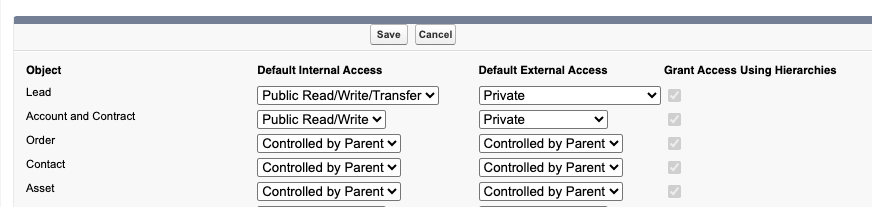
OWD를 변경하면 자동으로 Sharing Recalculation이 실행되서 기존에 있던 레코드들에 대해서 누가 볼수 있고, 누가 수정할 수 있는지 다시 계산을 합니다. 이때 Salesforce가 백그라운드 작업을 돌리게 됩니다.
OWD에서 권한을 너무 짜게 줘서 활동에 제한이 있을수 있어요. 그럴때는 위에서 소개한 Record-Level Security의 다음 단계들을 설정해서 권한을 열어주도록 합니다.
Hands-on Challenge
Configure Organization-Wide Defaults
For the Recruiting app, you must create a custom object to track referrals for positions. Referral records by default should be visible only to the record owner and shouldn’t be visible to users above the owner in the role hierarchy. Create the Referral custom object, then update the organization-wide default sharing setting for the Referral object.
Need Help?
- Review common issues.
- Get help on the challenges for this specific module.
Before You Start
- If you haven’t learned how to create a custom object, complete the Data Modeling module before you attempt this challenge.
- Create a custom object:
- Label:
Referral - Plural Label:
Referrals - Object Name:
Referral - Record Name:
Referral Name - Record Name Data Type: Text
- Label:
- Configure organization-wide default sharing settings for the Referral object so that Referral records are visible only to the record owner
- Configure the sharing settings so that Referral records aren’t visible to users above the owner in the role hierarchy. (We won’t check for this.)
풀이
Custom Ojbect만들기
- Setup > Object Manager > Create > Custom Object
- Label:
Referral - Plural Label:
Referrals - Object Name:
Referral - Record Name:
Referral Name - Record Name Data Type: Text
- Label:
- Save
OWD설정하기
- Setup > Quick Find > Sharing Settings
- Organization-Wide Defaults 안에 보면 Edit버튼이 있습니다.
- Referral객체를 찾아서 해당 사용자만 볼수 있게 변경합니다.
- Internal Access: Private
- External Access: Private
- 윗사람이 데이타를 볼 수 없게 합니다.
- 옆에 Grant Access Using Hierarchies의 체크박스를 Uncheck하세요.
- Save