Admin Intermediate > Formulas and Validations > Create Validation Rules
Validation Rules
필드에 Validation Rule를 걸어놓으면 입력 당시에 데이타가 유효한지를 검사하게 되어 엉뚱한 값이 들어오지 않게 미연에 방지를 할 수 있습니다.
Validation Rule은 크게 3가지로 구성됩니다:
- Rule Name – 이름
- Error condition Formula – 규칙
- Error Message – 규칙에 맞지 않을때 보여줄 메세지
Validation Rule만들기
Account Number가 8자리 문자열이 아닌경우 에러메세지 보여주기
- Setup > Object Manager > Account > Validation Rules > New
- Rule Name: Account_Number_8_Characters
- Error condition Formula: LEN( AccountNumber) <> 8
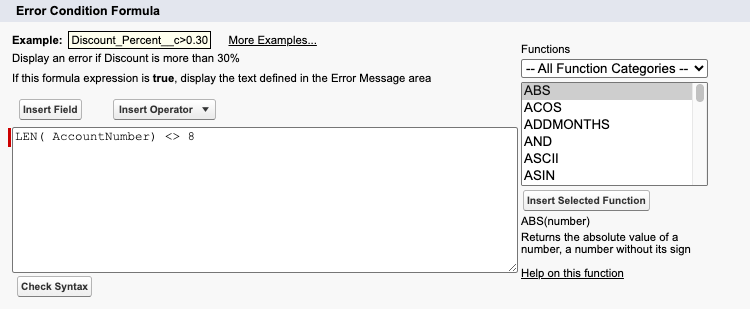
- Error Message: Account number must be 8 characters long.
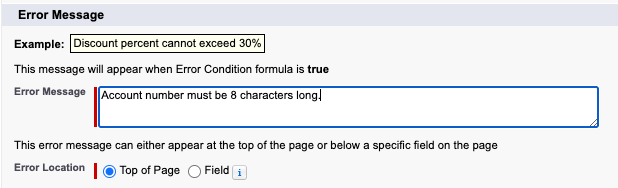
- Check Syntax눌러서 No errors found나오면 Okay
- Save
Validation Rule이 잘 적용이 되었는지 확인해볼게요
- Sales > Accounts > New
- Account Name: Test Account
- Account Number: 1234
- Save
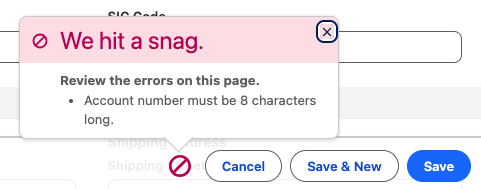
그러면 아래와 같이 우리가 입력했던 메세지가 팝업됩니다.
기타 유용한 팁
Account Number는 숫자로만
AND(
   NOT(ISBLANK(AccountNumber)),
   NOT(ISNUMBER(AccountNumber))
)
숫자가 아닌 문자가들어 왔을때 Account Number is not numeric.
날짜는 올해여야 함
YEAR(My_Date__c) <> YEAR(TODAY())입력한 날짜의 연도가 올해가 아닌경우 Date must be in the current year.
Salary 범위는 20,000 이하
(Salary_Max__c - Salary_Min__c) > 20000연봉차이가 2만불이상 나면 Salary range must be within $20,000.
웹사이트 확장자 검사
AND(
   RIGHT( Web_Site__c, 4) <> ".COM",
   RIGHT( Web_Site__c, 4) <> ".com",
   RIGHT( Web_Site__c, 4) <> ".ORG",
   RIGHT( Web_Site__c, 4) <> ".org",
   RIGHT( Web_Site__c, 4) <> ".NET",
   RIGHT( Web_Site__c, 4) <> ".net"
 )
도메인 뒷자리가 정해진 확장자가 아닌경우 Web Site must have an extension of .com, .org, or .net
청구지국가 유효성 체크
OR(
LEN(BillingCountry) = 1,
NOT(
CONTAINS(
"AF:AX:AL:DZ:AS:AD:AO:AI:AQ:AG:AR:AM:" &
"AW:AU:AZ:BS:BH:BD:BB:BY:BE:BZ:BJ:BM:BT:BO:" &
"BA:BW:BV:BR:IO:BN:BG:BF:BI:KH:CM:CA:CV:KY:" &
"CF:TD:CL:CN:CX:CC:CO:KM:CG:CD:CK:CR:CI:HR:" &
"CU:CY:CZ:DK:DJ:DM:DO:EC:EG:SV:GQ:ER:EE:ET:FK:" &
"FO:FJ:FI:FR:GF:PF:TF:GA:GM:GE:DE:GH:GI:GR:GL:" &
"GD:GP:GU:GT:GG:GN:GW:GY:HT:HM:VA:HN:HK:HU:" &
"IS:IN:ID:IR:IQ:IE:IM:IL:IT:JM:JP:JE:JO:KZ:KE:KI:" &
"KP:KR:KW:KG:LA:LV:LB:LS:LR:LY:LI:LT:LU:MO:MK:" &
"MG:MW:MY:MV:ML:MT:MH:MQ:MR:MU:YT:MX:FM:MD:MC:" &
"MC:MN:ME:MS:MA:MZ:MM:MA:NR:NP:NL:AN:NC:NZ:NI:" &
"NE:NG:NU:NF:MP:NO:OM:PK:PW:PS:PA:PG:PY:PE:PH:" &
"PN:PL:PT:PR:QA:RE:RO:RU:RW:SH:KN:LC:PM:VC:WS:" &
"SM:ST:SA:SN:RS:SC:SL:SG:SK:SI:SB:SO:ZA:GS:ES:" &
"LK:SD:SR:SJ:SZ:SE:CH:SY:TW:TJ:TZ:TH:TL:TG:TK:" &
"TO:TT:TN:TR:TM:TC:TV:UG:UA:AE:GB:US:UM:UY:UZ:" &
"VU:VE:VN:VG:VI:WF:EH:YE:ZM:ZW",
BillingCountry)))
Billing Country가 ISO 3166 2자리 코드에 해당하지 않으면 A valid two-letter country code is required.
Hands-on Challenge
Create a Validation Rule
Create a validation rule that displays an error message and prevents users from creating or updating a contact for an account if the contact and account have different zip codes. Allow creating and updating contacts that have no associated account.
- Create a validation rule:
- Rule Name:
Contact_must_be_in_Account_ZIP_Code - Operator: AND (return true if both conditions are true)
- Define the two conditions that, combined, will show the error message:
- The contact is associated with an account id
- The contact mailing zip code is different than the account shipping zip code
Hint: Use the API names (MailingPostalCode and Account.ShippingPostalCode) and the <> (Not Equal) operator.
- Enter an error message for the validation rule
- Rule Name:
풀이
연락처와 계정의 우편 번호가 다를 경우, 오류 메시지를 표시하여 사용자가 계정의 연락처를 생성하거나 업데이트할 수 없도록 제한하는 유효성 검사 규칙을 만듭니다. 연결 계정이 없는 연락처에 대해서는 생성 및 업데이트를 허용해야 합니다.
조건을 만드는 생각해야할 기준은 바로 에러메세지를 보여주는 조건입니다.
지금의 경우는 “AccountId가 비어있지 않고, Zip이 다른 경우에 에러메세지를 보여줘라”를 구현해야하는 거에요.
- Setup > Object Manager > Contact > Validation Rules > New
- Rule Name: Contact_must_be_in_Account_ZIP_Code
- Operator: AND
- Two Condition:
- Contact has an account
- NOT(ISBLANK(AccountId))
- If the zip codes are different
- Insert Field: Contact > Mailing Zip/Postal Code > Insert
- Insert Operator: <> Not Equal
- Insert Field: Contact > Account > Shipping ZipPostal Code > Insert
- 👉 MailingPostalCode <> Account.ShippingPostalCode
- Contact has an account
- Error Condition Formula
- AND(ISBLANK(AccountId), MailingPostalCode <> Account.ShippingPostalCode)
- Error Message
- Zipcode must match the account’s zipcode
- Check Syntax
- No errors found
- Save