Admin Intermediate > Build a Space Station App > Add Business Logic
Validation Rule
You need to create a validation rule that prevents users from saving a record for an Exhaust Port Inspector if the utilization is less than 150%.
utilization이 150이상이면 Exhaust Port Inspector를 입력하지 못하게 제한
- Setup > Object Manager > Resource > Validation Rules > New
- Rule Name: Inspectors_Must_Work_Overtime
- Error Condition Formula
- AND(Name = “Exhaust Port Inspector”, Utilization__c < 1.5)
- Check Syntax
- Error Message
- Exhaust Port Inspectors must work at least 150%. No coffee breaks!
- Error Location
- Field: Utilization
- Save
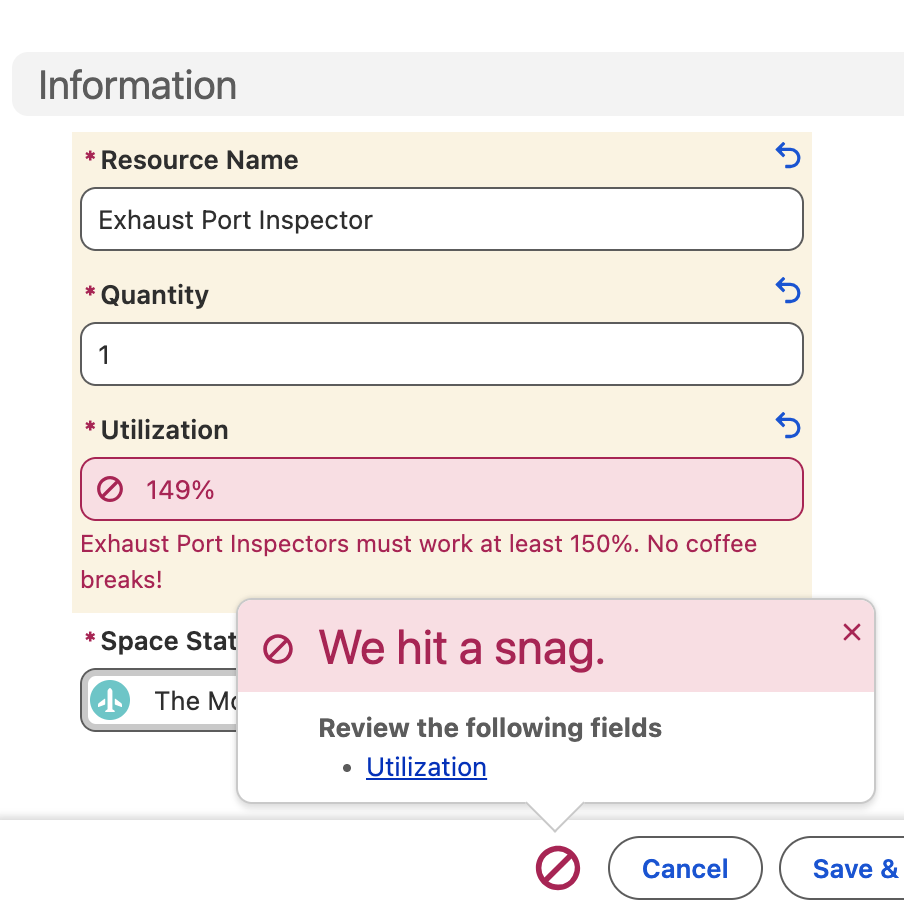
Validation Rule 테스트
- Setup > Space Stations > [The Mother Ship] > Related > Resources > New
- Resource Name: Exhaust Port Inspector
- Quantity: 1
- Utilization: 149
- Save
Resource가 Exhaust Port Inspector일때 Utilization이 150보다 작으면 저장이 되지 않고 에러메세지를 보여줍니다.
Flow
Space Station에 레코드가 생성/편집될 경우 실행되는 Flow인데, Shield Status가 Fully Operational일때만 Flow를 계속 진행한다.
Create Flow (Start)
- Setup > App Launcher > Automation > New > Record-Triggered Flow
- Object: Space Station
- Trigger the Flow When:
- ✅ A record is created or updated
- Set Entry conditions
- Condition Requirements: All Conditions Are Met (AND)
- Field: Shield Status
- Operator: Equals
- Value: Fully Operational
- When to Run the Flow for Updated Records
- ✅ Only when a record is updated to meet the condition requirements
- Save
- Flow Label:
Fully Operational Space Station - Flow API Name:
Fully_Operational_Space_Station
- Flow Label:
- Save
Action
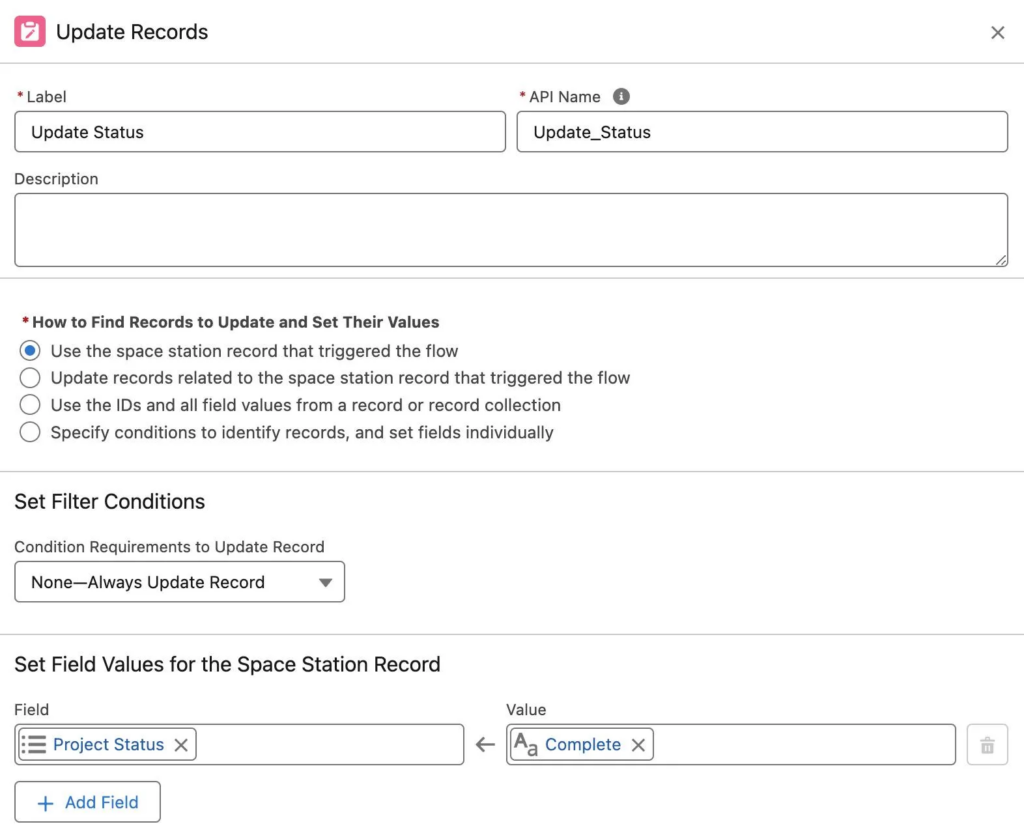
Space Station의 Shield Status가 Fully Operational일때 Project Status를 Complete로 자동으로 바꾼다.
- Start >
 > Update Triggering Record
- Label: Update Status
- API Name: Update_Status
- How to Find Records to Update and Set Their Values
- ✅ Use the space station record that triggered the flow
- Set Filter Conditions:
- None—Always Update Record
- Set Field Values for the Space Station Record
- Field: Project Status
- Value: Complete
- Save
Post to Chatter
- Update Status >
 > Action
 - Search Actions: Post to Chatter
- Label: Post to Chatter
- API Name: Post_to_Chatter
- Message:
- {!$Record.Name} is complete! Now witness the comfort of being protected by the best shield in the galaxy!
- Target Name or ID:
- Triggering Space_Station__c > Record ID
- Save
- Activate
Test the Flow
데이타를 저장하기 전에 Project Status가 자동으로 변경되는지를 보기 위해서 Project Status의 값이 뭔지 한번 봐둡니다.
- Setup > Space Stations > [The Mother Ship] > Edit
- Project Status: Green
- Shield Status: Fully Operational
- Save
저장하고나면 Project Status가 Complete으로 변경되어 있습니다.
Vocabulary
- mischief: 장난
- Playful misbehavior or troublemaking, especially in children.
- pesky: 성가신