Admin Intermediate > Picklist Administration > Share Values with Global Value Sets
Global Value Sets란?
예를 들어 요리레시피 사이트를 운영하는 회사가 있어요. 그 회사에서 레시피에 요리재료를 추가할때 각 재료를 선택할 수 있게 선택상자를 보여주잖아요. 그런데 쇼핑목록을 관리하는 기능도 있어서 새로운 아이템 추가하기를 누르면 선택상자가 재료를 나열하고 그중에 하나를 선택할 수 있게 하는데 첫번째는 레시피에 들어가는 요리재료 목록이고, 두번째는 쇼핑목록이니까 두개가 서로 다른 필드란 말이에요. 그런데 두개의 선택상자에는 결국 동일한 목록이 들어가야하는데 각 필드에서 두번 나열해주는건 뭔가 비효율적이라고 느껴져요. 특히 목록에 재료를 하나더 추가해야할 경우에는 양쪽 필드에 다 추가를 해줘야하는데 너무 시간이 많이 소요되는것 같아요.
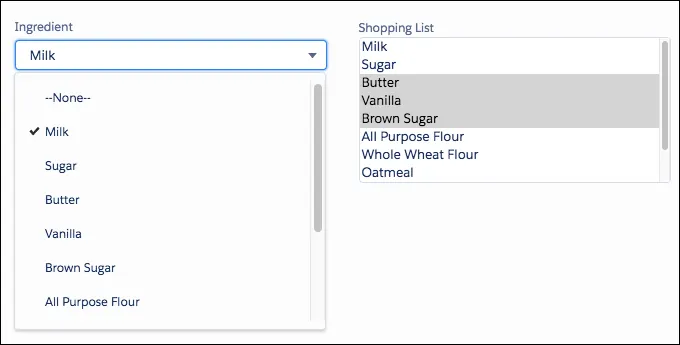
그래서 나온 개념이 Global Value Set입니다. 목록으로 나열할 수 있는 값들을 전역변수로 모아서 한 곳에서 관리하고 필드들은 해당 목록을 가져다가 쓰기만 하면 되서 따로따로 관리할 필요가 없어요.
Create a Global Value Set
전역으로 사용할 Global Value Set을 만들려면
- Setup > Quick Find > Picklist Value Sets > Global Value Sets > New
- Label: Ingredients
- Name: Ingredients
- Values
- Milk
- Sugar
- Butter
- Vanilla
- Brown Sugar
- All Purpose Flour
- Whole Wheat Flour
- Oatmeal
- Save
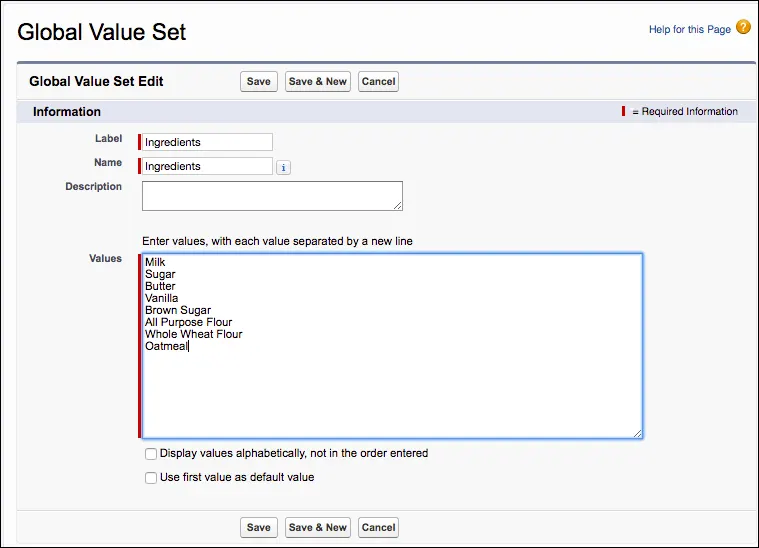
생성과 마찬가지로 여기에서 목록을 수정하거나 삭제하는 등의 관리를 할수 있습니다.
만약에 일반 필드에서 사용하던 목록을 Global Value Set으로 만들고 싶다면 필드수정화면에서 Promote to Global Value Set버튼을 클릭해서 해당 목록을 Global Value Set으로 만들 수 있습니다.
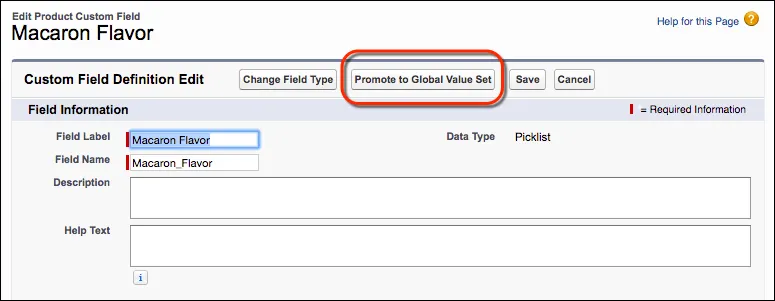
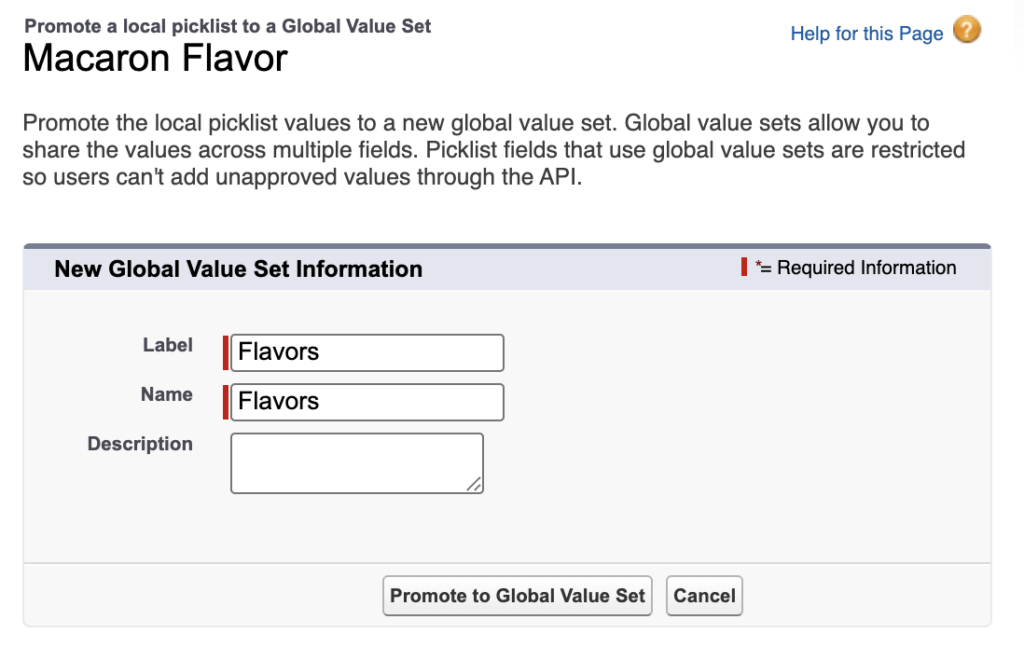
Promote to Global Value Set을 클릭하면 Global Value Set의 Lable과 Name을 넣는 팝업이 뜨는데 이름을 정하고 팝업하단에 Promote to Global Value Set버튼을 누르면 저장이 됩니다.
Use the Global Value Set in a Picklist Field
Global Value Set을 필드에 적용하시려면
- Setup > Object Manager > Object(Product) > Fields & Relationships > New
- Data Type: Picklist
- Field Label: Ingredient
- ✅ Use global picklist value set
- Ingredients
- Next, Next, Save
Hands-on Challenge
Promote an existing picklist’s values to a global value set, and assign it to another picklist
You decided to create T-shirts for each of your flavors to help promote them. So you want a T-shirt selection picklist that uses the same values as your macaron flavors.
- Promote the values of the Macaron Flavor field to a global value set with the following settings:
- Label: Flavors
- Name: Flavors
- Create a field with the following settings:
- Object: Product
- Field Type: Picklist
- Field Label: Shirt
- Field Name: Shirt
- Values: Flavors global value set
- Make this field visible to all user profiles
풀이
기존의 Picklist에 정의된 목록값을 Global Value Set으로 변경하고, 해당 목록을 다른 필드에도 사용해보세요.
이번에 프로모션 행사로 마카롱 맛별로 티셔츠를 만들어서 배포하기로 결정했어요.
현재 Macaron Flavor에 있는 목록값을 global value set으로 변경합니다.
- Setup > Object Manager > Product > Fields & Relationships > Macaron Flavor > Edit
- 여기서 상단에 Promote to Global Value Set버튼을 클릭한뒤 아래의 정보를 입력하세요.
- Label: Flavors
- Name: Flavors
- Promote to Global Value Set버튼을 한번더 눌러서 완료합니다.
방금 만든 Global Value Set을 함께 사용할 필드를 하나 추가 하겠습니다.
- Setup > Object Manager > Product > Fields & Relationships > New
- Data Type: Picklist
- Field Label: Shirt
- Field Name: Shirt
- Values: Use global picklist value set
- Flavors 선택
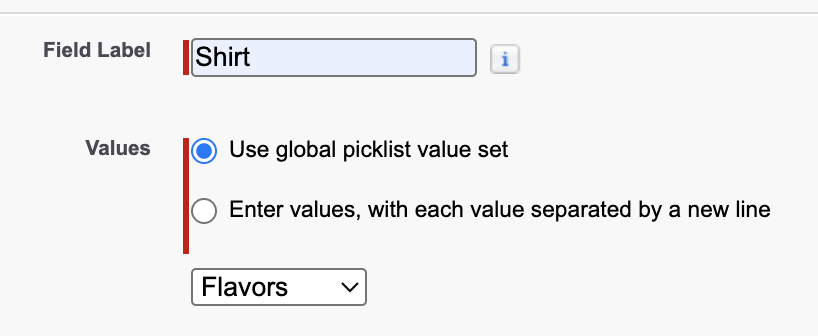
- Flavors 선택
- Step 3. Establish field-level security에서 모든 Profile에 Visible을 선택하고 넘어가세요
- Save